Open-source hardware wallet with a secure element supporting 200+ networks at $69.99, offering transparent firmware for independent security verification.
The SafePal X1 is a mixed-value proposition at $69.99, offering broad coverage but cutting corners on critical security features. Its EAL5+ secure element, open firmware, and support for 200+ networks make it a capable daily driver for diversified portfolios. Reproducible builds are absent and offline QR signing is unsupported, making it a poor fit for users who prioritize supply-chain verification or air-gapped operation.
The SafePal X1 uses a secure element rated at EAL5+ — the same certification tier as the Ledger Nano X's ST33 chip and above the EAL4+ found in Trezor Safe 3's Optiga Trust M. SafePal does not publicly disclose the specific secure element model, which is a transparency gap worth noting. Vendor claims EAL5+ certification — the exact chip vendor is not independently verified.
Firmware is open source, which is a meaningful step above Ledger's closed-source model. However, reproducible builds are not supported, meaning you cannot independently compile and verify that the binary running on your device matches the published source code. Trezor supports reproducible builds; SafePal does not, which is a concrete security disadvantage for technically sophisticated users.
Genuine device verification is present — the X1 performs an authenticity check on boot via secure boot, which guards against firmware tampering at the hardware level. Supply chain attestation relies on this secure boot mechanism plus a QR-code verification process through the SafePal app — vendor-claimed, not independently audited.
Bluetooth connectivity introduces an attack surface that air-gapped alternatives like the Coldcard Mk4 or Passport 2 entirely avoid. No public CVEs are currently attributed to the X1 specifically, but the Bluetooth stack has not undergone a published third-party security audit as of this writing.
Secure element: EAL5+ (chip model undisclosed)
Firmware: open source, no reproducible builds
Secure boot: present
Bluetooth: active attack surface, no published audit
SecurityKey Factor
The SafePal X1 generates a 24-word BIP39 mnemonic on-device during setup. 24 words is the maximum standard length and provides 256 bits of entropy — on par with Ledger Nano X and Trezor Model T. The seed is displayed on the 1.8-inch LCD screen for manual transcription; no NFC card export or encrypted digital backup option is offered.
Backup options are limited to paper or metal plate transcription of the mnemonic — no Shamir Secret Sharing (SLIP39), no multi-card split backup. Coldcard Mk4 supports SeedQR and encrypted microSD backup; Passport 2 supports encrypted microSD as well. The X1 offers neither, which is a meaningful gap for users who want redundant, tamper-evident backup strategies.
BIP39 passphrase support is present, enabling hidden wallets — a critical feature for plausible deniability under duress. The passphrase is entered via the companion app or device interface.
Restoring on a new device is standard BIP39 — any compatible wallet (Trezor, Ledger, or another SafePal unit) can recover funds from the 24-word seed. The process is straightforward for anyone familiar with hardware wallets but may be confusing for first-time users without guided documentation. If the device is lost or broken, funds are recoverable as long as the seed phrase is intact — the hardware itself is not required.
Recovery & backups
Initial setup takes approximately 10–15 minutes, including downloading the SafePal app (iOS and Android), pairing via Bluetooth, and completing seed generation. The process is guided through the app, which reduces friction for beginners but means the phone is involved in setup — unlike Trezor Suite's desktop-first approach.
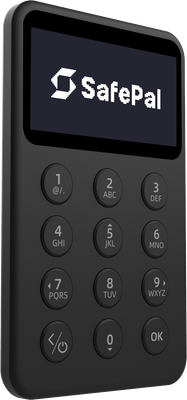
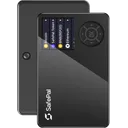
The 1.8-inch LCD display is color, which aids readability compared to the monochrome e-ink screens on Coldcard Mk4 or the small OLED on Ledger Nano S Plus. Navigation uses physical buttons. The screen is adequate for address verification, though the 54×86mm form factor means the device is slim and pocketable at 50g.
Daily use for sending involves confirming transaction details on the device screen over Bluetooth — the workflow is comparable to Ledger with Ledger Live, but the SafePal app is less mature than Ledger Live in terms of portfolio analytics and third-party integrations. Receiving is straightforward: generate address in app, verify on device.
The companion app covers iOS, Android, Windows, macOS, and Linux. The desktop app is functional but receives less frequent updates than the mobile version. Users accustomed to Trezor Suite's clean interface may find the SafePal app more cluttered, particularly given its DeFi and exchange features embedded directly in the UI. Complete beginners will manage; users wanting a minimal, transaction-only interface may prefer Trezor's approach.
Usability / UX
The SafePal X1 supports over 200 blockchain networks, including Bitcoin, Ethereum, BNB Chain, Solana, Polygon, Avalanche, and Tron — a broader out-of-the-box network count than Ledger Nano S Plus (which requires manual app installs with limited storage) and significantly more than Trezor Model One's native support.
Third-party wallet compatibility includes MetaMask via the SafePal browser extension and WalletConnect for DeFi interactions. Native Sparrow Wallet or Electrum integration is not documented, which is a limitation for Bitcoin-focused users who rely on PSBT workflows with desktop coordinators. Coldcard and Passport both have deeper Sparrow/Electrum integration.
NFT display and management is supported within the SafePal app. WalletConnect v2 support enables interaction with a broad range of dApps. The built-in swap and buy features inside the app are custodial third-party services — not relevant to hardware wallet security but present in the UI.
200+ networks supported natively
MetaMask and WalletConnect compatible
No documented Sparrow/Electrum PSBT workflow
NFT management via companion app
Ecosystem & integrations
Creating a SafePal account is not required to use the X1 — the app can be used without registration, which is a baseline privacy positive. However, the SafePal app connects to SafePal's servers for balance lookups and transaction broadcasting by default, meaning your IP address and address data are exposed to SafePal's infrastructure unless you route traffic through a VPN or Tor.
There is no documented Tor integration within the SafePal app, unlike Wasabi Wallet's native Tor support or Trezor Suite's optional Tor toggle. Custom node configuration for Bitcoin is not prominently featured, limiting privacy for BTC users compared to Coldcard + Sparrow (which supports Tor and custom Electrum servers natively).
Telemetry behavior is not clearly disclosed in SafePal's public documentation — whether usage analytics are collected and whether opt-out is possible is not independently verified. CoinJoin is not supported. The device can operate offline for signing if paired workflows are established, but the app itself requires internet for full functionality. For privacy-critical use cases, Coldcard Mk4 or Passport 2 — both designed around air-gapped, node-connected workflows — are materially stronger options.
Privacy
The SafePal X1 retails at $69.99 USD, positioning it in the mid-tier hardware wallet segment. Direct comparisons:
At $69.99, the X1 undercuts the Ledger Nano X by $79 while matching its EAL5+ secure element claim and adding open-source firmware. The primary trade-off versus the Trezor Safe 3 ($79, only $9 more) is that the Safe 3 offers reproducible builds and an EAL6+ chip — a stronger security argument for $9 extra.
Best value for: Users who want multi-chain support across 200+ networks, Bluetooth convenience, and an open-source firmware base without paying Ledger's premium. Suitable for active DeFi users on BNB Chain, Solana, and EVM chains who want hardware security without the Ledger ecosystem lock-in.
Look elsewhere if: You prioritize Bitcoin-only security with air-gapped signing (Coldcard Mk4 at $147.94), reproducible builds (Trezor Safe 3 at $79), or a fully audited supply chain attestation process.
Price & value
The SafePal X1 is a solid mid-range hardware wallet that punches above its $69.99 price point in several areas, but falls short of premium competitors in a few meaningful ways — making it a genuinely mixed recommendation depending on your priorities.
Buy this wallet if:
You are a mobile-first user who wants Bluetooth connectivity with both iOS and Android, and values the flexibility of managing assets on the go without being tethered to a desktop.
You are a multi-chain enthusiast managing a diverse portfolio — support for over 200 networks at under $70 is genuinely impressive and hard to match at this price tier.
You are a security-conscious beginner who wants an EAL5+ Secure Element, open-source firmware, and a genuine device check without paying $150+ for a Ledger Flex or Trezor Safe 5.
Skip this wallet if:
You prioritize advanced recovery options — the X1 lacks Shamir Secret Sharing, which the Trezor Safe 3 ($79) offers, making it a better choice if redundant backup schemes matter to you.
You need reproducible builds for maximum firmware auditability — the X1's open-source code cannot be independently verified build-for-build, unlike the Coldcard Mk4 ($149.99) which sets the gold standard here.
You work in harsh physical environments — the plastic chassis with no water resistance rating is a liability; consider the more ruggedized Keystone 3 Pro ($169) instead.
If choosing between the SafePal X1 and the Trezor Safe 3 ($79), the Trezor wins on software maturity, community trust, and Shamir backups — but the X1 wins on chain breadth and Bluetooth mobility. If choosing between the SafePal X1 and the Ledger Nano X ($149), the X1 undercuts it by $80 with a comparable Secure Element rating and similar Bluetooth feature set, making it the smarter buy unless you are deeply embedded in the Ledger Live ecosystem.
The SafePal X1 earns its place as a capable, affordable option for mobile-focused users who want broad chain support and solid security fundamentals — just know its limitations before committing.
✓ Our Verdict
The SafePal X1 is a solid mid-range hardware wallet that punches above its $69.99 price point in several areas, but falls short of premium competitors in a few meaningful ways — making it a genuinely mixed recommendation depending on your priorities.
Buy this wallet if:
You are a mobile-first user who wants Bluetooth connectivity with both iOS and Android, and values the flexibility of managing assets on the go without being tethered to a desktop.
You are a multi-chain enthusiast managing a diverse portfolio — support for over 200 networks at under $70 is genuinely impressive and hard to match at this price tier.
You are a security-conscious beginner who wants an EAL5+ Secure Element, open-source firmware, and a genuine device check without paying $150+ for a Ledger Flex or Trezor Safe 5.
Skip this wallet if:
You prioritize advanced recovery options — the X1 lacks Shamir Secret Sharing, which the Trezor Safe 3 ($79) offers, making it a better choice if redundant backup schemes matter to you.
You need reproducible builds for maximum firmware auditability — the X1's open-source code cannot be independently verified build-for-build, unlike the Coldcard Mk4 ($149.99) which sets the gold standard here.
You work in harsh physical environments — the plastic chassis with no water resistance rating is a liability; consider the more ruggedized Keystone 3 Pro ($169) instead.
If choosing between the SafePal X1 and the Trezor Safe 3 ($79), the Trezor wins on software maturity, community trust, and Shamir backups — but the X1 wins on chain breadth and Bluetooth mobility. If choosing between the SafePal X1 and the Ledger Nano X ($149), the X1 undercuts it by $80 with a comparable Secure Element rating and similar Bluetooth feature set, making it the smarter buy unless you are deeply embedded in the Ledger Live ecosystem.
The SafePal X1 earns its place as a capable, affordable option for mobile-focused users who want broad chain support and solid security fundamentals — just know its limitations before committing.
Ready to buySafePal X1?
We may earn a commission if you purchase through our links. This doesn't affect our editorial independence.
Impermanent loss happens when asset prices in a liquidity pool diverge from external markets, reducing the value of liquidity providers' holdings compared to simply holding the assets.
EAL Certification (Evaluation Assurance Level) from Common Criteria rates the security of hardware components, like secure chips in crypto hardware wallets. Higher levels, such as EAL5+ or EAL6+, indicate stronger resistance to attacks.
Reproducible Builds refer to the process where the same source code consistently produces identical binary outputs, ensuring verifiable and trustworthy software in blockchain and crypto projects.
Firmware Attestation is the process of verifying the authenticity of a device's firmware to ensure it has not been tampered with, commonly used in hardware wallets for security.
Secure Boot is a security feature that ensures only trusted software runs on a device by verifying its integrity during startup, preventing unauthorized code execution in crypto systems.
Bluetooth Connectivity enables wireless communication between devices, like hardware wallets and smartphones, using Bluetooth or Bluetooth Low Energy (BLE) for secure data transfer.
BIP39 is a standard for generating mnemonic seed phrases that are used to create deterministic wallets and securely back up cryptocurrency private keys.
A backup in cryptocurrency is a secure copy of a wallet's seed phrase or private keys. It enables recovery of funds if the original wallet is lost or damaged.
Shamir Secret Sharing (SSS) divides a secret, like a crypto wallet seed, into multiple shares. A threshold number of shares reconstructs it, enhancing security as in SLIP-39 backups.
A passphrase is an additional security layer for cryptocurrency wallets, acting as a 25th word in the BIP39 seed phrase, protecting access to hidden wallets.
Plausible Deniability refers to the ability to deny knowledge or possession of cryptocurrency by using techniques like decoy wallets or hidden volumes, ensuring privacy under duress.
A companion app is a software application used to manage and interact with cryptocurrency wallets or blockchain networks, typically offering features like transactions and security controls.
Address Verification confirms the receiving address shown on a hardware wallet's screen matches the one on the computer or app, preventing malware from altering it.
Ledger Live is a software application that manages cryptocurrency assets and interacts with Ledger hardware wallets for secure transactions and portfolio management.
DeFi (Decentralized Finance) refers to a set of financial services, such as lending and trading, built on blockchain technology without traditional intermediaries like banks.
In cryptocurrency, a swap is the direct exchange of one token for another on a blockchain, often via decentralized exchanges (DEXs) without intermediaries.
Bitcoin (BTC) is the first decentralized cryptocurrency, launched in 2009. It uses blockchain technology for secure, peer-to-peer digital transactions without intermediaries.
Ethereum is a decentralized blockchain platform that enables smart contracts and decentralized applications (dApps). Its native cryptocurrency is Ether (ETH).
BNB Chain is a high-performance blockchain network developed by Binance, formerly Binance Smart Chain (BSC). It supports smart contracts, DeFi, and uses BNB as its native token.
Solana is a high-performance layer-1 blockchain platform that enables fast, low-cost transactions using Proof of History and Proof of Stake. Its native token is SOL.
Polygon is a layer-2 scaling solution for Ethereum that enables faster, cheaper transactions via its Proof-of-Stake sidechain. Native token: MATIC (also called Polygon PoS).
Avalanche (AVAX) is a scalable layer-1 blockchain platform that achieves high throughput and sub-second transaction finality using its novel proof-of-stake consensus.
TRON is a blockchain platform and cryptocurrency (TRX) designed for high-throughput decentralized applications, especially in content sharing and entertainment.
WalletConnect is a protocol that enables secure communication between decentralized applications (dApps) and mobile wallets through QR code scanning or deep linking.
Electrum is a lightweight Bitcoin wallet that allows users to store, send, and receive Bitcoin securely. It is known for its speed and low resource usage.
PSBT (Partially Signed Bitcoin Transaction) is a Bitcoin transaction format that allows multiple parties to sign a transaction incrementally before finalizing it.
Coldcard is an air-gapped hardware wallet for Bitcoin, made by Coinkite, that stores private keys offline and signs transactions without internet exposure.
An NFT (Non-Fungible Token) is a unique digital asset stored on a blockchain, representing ownership of a specific item, such as artwork, music, or virtual goods.
Telemetry in cryptocurrency and blockchain refers to the automatic collection and transmission of anonymous usage data, metrics, and error reports from wallets or nodes to improve software.
CoinJoin is a privacy technique in cryptocurrency where multiple users combine their transactions, making it harder to trace individual senders and receivers.
Offline Signing refers to signing cryptocurrency transactions on a device that is not connected to the internet, ensuring private keys remain secure from online threats.
Recovery is the process of restoring access to a cryptocurrency wallet using its seed phrase or mnemonic backup if the original wallet is lost or inaccessible.
IP Rating refers to the level of protection a device has against dust and water, often used for hardware wallets to indicate their durability in various environments.
SafePal X1 uses a certified Secure Element chip to store private keys in tamper-resistant hardware. Even if the device's software were compromised, the Secure Element isolates your keys from extraction. The firmware is open-source, meaning security researchers worldwide can audit the code for vulnerabilities. The device has been independently security audited.
What if SafePal goes out of business?
SafePal's firmware is open-source — even if the company disappears, the community can maintain the software. Your seed phrase works with any BIP39-compatible wallet, so your funds are always recoverable.
What if I lose my SafePal X1?
Your cryptocurrency is stored on the blockchain, not on the device. If you lose your SafePal X1, you can recover full access using your seed phrase on any compatible wallet.
How long will SafePal X1 receive security updates?
SafePal actively maintains SafePal X1 with regular firmware updates.
Is SafePal X1 safe to use?
The SafePal X1 is reasonably secure for its price range. It features an EAL5+ certified Secure Element, secure boot, and genuine device verification, which are strong fundamentals. The firmware is open source, adding transparency. However, reproducible builds are not supported, meaning you cannot independently verify that the published source code matches the firmware running on your device. For most users storing moderate amounts of crypto, it offers solid protection. High-value holders may prefer wallets with reproducible builds and a longer security track record.
Is SafePal X1 worth it for the price?
At $69.99, the SafePal X1 delivers competitive value. You get Bluetooth connectivity, a 1.8-inch LCD screen, a battery for wireless use, support for over 200 blockchain networks, and an EAL5+ Secure Element — features typically found in more expensive devices. The plastic build and lack of water resistance are trade-offs at this price point. If you need broad chain support and wireless convenience on a budget, it is worth considering. If durability or advanced features like Shamir Secret Sharing matter to you, look at pricier alternatives.
SafePal X1 vs Ledger Nano X: which is better?
Both wallets use Bluetooth and a Secure Element, but they differ in key ways:
Security: Ledger's firmware is partially closed-source; SafePal X1 has fully open-source firmware, though without reproducible builds.
Chain support: SafePal X1 supports 200+ networks; Ledger Nano X supports a comparable range via Ledger Live.
Price: SafePal X1 costs $69.99 vs the Nano X at ~$149.
Build quality: Ledger uses an aluminum casing; SafePal X1 is plastic.
SafePal X1 wins on price and open-source transparency; Ledger wins on brand maturity and build quality.
How many coins does SafePal X1 support?
The SafePal X1 supports over 200 blockchain networks, covering major assets like Bitcoin, Ethereum, BNB Chain, Solana, and a wide range of EVM-compatible chains and their tokens. It uses the BIP-39 standard with a 24-word recovery phrase and supports BIP-39 passphrases for added security. Coin control is also available for supported UTXO chains. For the most current and complete list of supported assets, check the official SafePal website, as support is updated with firmware releases.
Can SafePal X1 be trusted given it is backed by Binance?
SafePal received early investment from Binance, which raises a valid concern about independence. However, SafePal operates as a separate company and the X1's open-source firmware allows public code review, reducing reliance on trusting any single entity. Your private keys are generated and stored on the device's Secure Element and never leave it. That said, users who prioritize full independence from exchange-affiliated entities may prefer brands with no such ties. The open firmware is a meaningful safeguard, but the corporate relationship is a factor worth weighing.
How do I set up SafePal X1?
Setting up the SafePal X1 is straightforward:
Power on the device and follow the on-screen prompts to create a new wallet or restore an existing one.
The device generates a 24-word BIP-39 seed phrase — write it down offline and store it securely.
Optionally, add a BIP-39 passphrase for an extra layer of protection.
Install the SafePal App on iOS or Android and pair via Bluetooth or USB.
The app supports Windows, macOS, and Linux as well.
The entire process typically takes under 10 minutes.
Does SafePal X1 have any known vulnerabilities or security concerns?
No critical public exploits have been disclosed for the SafePal X1 at the time of writing. The main documented concern is the absence of reproducible builds, which means the community cannot fully verify firmware integrity independently. Additionally, Bluetooth connectivity, while convenient, theoretically expands the attack surface compared to air-gapped devices. SafePal has published security audits and maintains an open-source repository, which allows ongoing community scrutiny. As with any hardware wallet, physical security of the device and offline backup of your seed phrase remain the most important factors in practice.
Some links on this page are affiliate links. If you purchase through them, I may earn a commission at no additional cost to you. This helps support the site and allows me to continue creating detailed, independent reviews.
Our testing methodology is evolving. Ratings and assessments will be refined as we improve our scoring framework to reflect the most accurate results.
Ready to get SafePal X1?
Long-term support • Secure Element • Security audited • Bluetooth • Open source