Budget-friendly hardware wallet at $49.99 supporting 200+ networks with a secure element, though closed-source firmware limits independent security verification.
The SafePal S1 is a mixed proposition: competitively priced at $49.99 with an EAL6+ secure element and air-gapped QR-only connectivity, but significant trust gaps remain. Supporting 200+ networks and 30,000+ tokens via fully offline signing makes it a broad-coverage option for mobile users. Closed-source firmware with no reproducible builds means security cannot be independently verified — a hard pass for anyone prioritizing auditability.
The SafePal S1 uses a secure element rated at EAL6+ — the same certification tier as the Ledger Nano X's ST33 chip. SafePal does not publicly disclose the specific chip model, which is a transparency gap. Vendor claims EAL6+ — the exact chip manufacturer is not independently verified.
The firmware is closed source, with no reproducible builds and no open firmware option. This means you cannot independently verify what code is running on the device. Coldcard (Mk4) and Passport both offer open-source firmware, making them significantly more auditable. Ledger's firmware is also closed source, so the S1 is not uniquely opaque in this segment, but it's a real limitation regardless.
Genuine device verification is present: the S1 uses a self-destruct mechanism that erases keys and displays a tamper alert if the enclosure is physically breached. Vendor claims this as supply chain protection — the effectiveness against sophisticated interdiction attacks is not independently tested.
Secure boot is implemented, meaning the device verifies firmware integrity at startup. Firmware updates are delivered via the SafePal app — no USB connection is used; updates are pushed via QR code, which limits the USB attack surface entirely.
No USB, Bluetooth, or NFC connectivity eliminates entire classes of remote attack vectors
Air-gapped QR signing is the sole communication method — a genuine security advantage over USB-connected wallets like Trezor Model T
No known public CVEs at time of writing, but closed source firmware makes independent discovery difficult
SecurityKey Factor
The SafePal S1 generates a 24-word BIP39mnemonic seed entirely on-device, with no internet or USB connection during the process. The air-gapped generation is a genuine advantage over wallets that rely on companion app involvement during setup.
Backup options are limited to the standard paper mnemonic — there is no native Shamir Secret Sharing (SLIP39), no multi-card split backup, and no proprietary encrypted backup scheme. For comparison, the Trezor Model T supports SLIP39 Shamir backups natively, allowing you to split recovery across multiple shares with configurable thresholds. The S1 offers none of this.
Passphrase support (BIP39) is present, enabling hidden wallet functionality. This is a meaningful addition for plausible deniability under duress.
Recovery on a new device is straightforward: any BIP39-compatible wallet (Ledger, Trezor, Coldcard, software wallets) can restore from the same 24-word seed. You are not locked into SafePal hardware for recovery, which is important given the brand's relatively short track record compared to Ledger or Trezor.
No metal backup solution is sold by SafePal directly — third-party steel plates are required
No Shamir support is a notable gap versus Trezor Model T at $219
Passphrase support adds a meaningful second factor for high-value holdings
If the device is lost or broken, standard BIP39 restoration on any compatible wallet works without issue — assuming the seed backup was stored correctly.
Recovery & backups
Initial setup takes approximately 10–15 minutes, involving seed generation, writing down 24 words, and pairing with the SafePal mobile app via QR code. There is no desktop app — Windows, macOS, and Linux are not supported. The companion app runs on iOS and Android only, which is a hard limitation for desktop-first users.
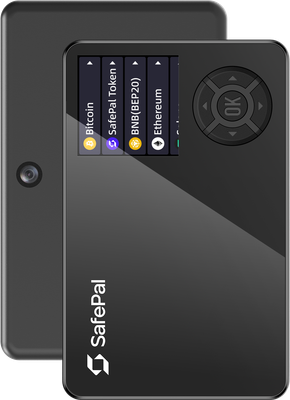
The display is a 1.3-inch color LCD — larger and more readable than the Ledger Nano S Plus's small monochrome screen, but smaller than the Trezor Model T's 2.4-inch touchscreen. Navigation uses physical D-pad buttons, not a touchscreen. Transaction details are displayed as QR codes scanned by the app, which adds 2–3 extra steps per transaction compared to USB-connected wallets.
Daily use workflow: open SafePal app → create transaction → scan QR from app to device → confirm on device → scan signed QR from device back to app → broadcast. This is more friction than Ledger or Trezor's USB flow, but it eliminates USB attack surface entirely.
No desktop support is a dealbreaker for users who primarily use MetaMask or Electrum on PC
The QR-based workflow suits mobile-first users comfortable with scanning multiple codes per transaction
Battery-powered operation (vendor claims ~20 days standby) means no charging cable needed for signing sessions
Beginners comfortable with mobile apps will adapt within a few sessions. Power users expecting desktop integration or touchscreen navigation will find the experience inferior to the Trezor Model T or Keystone Pro.
Usability / UX
The SafePal S1 supports over 200 blockchain networks and more than 30,000 tokens — one of the broadest multi-chain coverage figures in the sub-$100 hardware wallet segment. Key L1 chains include Bitcoin, Ethereum, BNB Chain, Solana, Tron, Polkadot, and Cosmos. SafePal was incubated by Binance, and BNB Chain support is particularly deep.
Third-party wallet compatibility is limited by the air-gapped QR architecture. There is no native MetaMask hardware wallet integration via USB or WebUSB — a significant gap versus Ledger and Trezor, which both support MetaMask directly. WalletConnect is supported through the SafePal app for DeFi interactions, but this routes through SafePal's own app rather than a standalone browser extension.
No Electrum or Sparrow Bitcoin wallet integration — Bitcoin power users requiring PSBT-over-QR with Sparrow should look at Coldcard or Keystone Pro instead
NFT display and management is supported within the SafePal app
DeFi access is available via the built-in dApp browser in the SafePal app
No desktop wallet compatibility at all — Linux and Windows users have zero native options
For users primarily operating within the BNB Chain and mobile DeFi ecosystem, coverage is strong. For Bitcoin-only or Ethereum desktop DeFi users, the integration gaps versus Ledger Nano X ($149) or Trezor Model T ($219) are substantial.
Ecosystem & integrations
The SafePal app requires account registration — an email address is needed to use the companion app, which is a direct privacy cost. Coldcard requires no account, no app, and no internet-connected companion software. Foundation's Passport similarly requires no registration. The S1's mandatory account linkage ties device usage to an identifiable email.
Telemetry practices within the SafePal app are not publicly documented in detail. Whether usage data is collected and whether opt-out is possible is not clearly disclosed in the app's privacy policy — vendor claims data is not sold, but independent verification is not available.
The device itself is fully air-gapped and can sign transactions without any internet connection. However, the SafePal app must broadcast transactions, meaning transaction data passes through SafePal's infrastructure unless you manually extract and broadcast signed transactions via a separate tool — a workflow that is not well-documented for average users.
No CoinJoin support — Bitcoin privacy transactions are not natively facilitated
Tor or VPN can be used at the OS level when running the mobile app, but no native Tor integration exists
Mandatory email registration is a concrete privacy disadvantage versus Coldcard ($157) and Passport ($199), both of which require no account
Privacy
The SafePal S1 retails at $49.99, positioning it as one of the cheapest hardware wallets with a secure element on the market. Direct price comparisons:
Ledger Nano S Plus: $79 — USB-connected, EAL6+ secure element, desktop support, MetaMask integration. Better ecosystem integration at $29 more.
Trezor Model One: $69 — open-source firmware, no secure element, USB-connected. More auditable but less secure hardware at $19 more.
Keystone Pro: $169 — air-gapped QR like the S1, open-source firmware, larger touchscreen, Sparrow/MetaMask QR support. A significantly more capable air-gapped device at 3.4x the price.
Coldcard Mk4: $157 — Bitcoin-only, fully open source, no account required. Incomparable for Bitcoin security, but single-chain only.
At $49.99, the S1 delivers genuine value for mobile-first users who want air-gapped security across a wide range of chains without spending $150+. The EAL6+ secure element at this price point is notable — the Trezor Model One at $69 has no secure element at all.
The S1 is a poor value choice for desktop users (zero desktop support), Bitcoin power users (no Sparrow/Electrum integration), or privacy-conscious users (mandatory account registration). Those users should budget for Coldcard Mk4, Keystone Pro, or Ledger Nano X respectively. For a first hardware wallet on a tight budget with mobile-only usage, the $49.99 price is genuinely competitive.
Price & value
Verdict: SafePal S1 is a strong budget, air-gapped-style hardware wallet that prioritizes QR-based offline signing and wide asset coverage, but it comes with notable trade-offs in transparency and desktop support.
Recommended for: Users who want an affordable, compact wallet (about 33g) with QR-only signing (no USB/Bluetooth/NFC) and a secure element (EAL6+), plus basic multisig and support for many networks/tokens (200+ networks, ~30,000 tokens). It’s especially suitable if you primarily manage crypto from iOS/Android and value a workflow that keeps the device isolated from direct data connections.
Who should avoid it: Power users who prioritize open-source firmware, reproducible builds, or maximum auditability—SafePal S1 is not open source and does not offer reproducible builds. Also avoid it if you need desktop support (no Windows/macOS/Linux compatibility listed) or if you strongly prefer USB/Bluetooth convenience. Those wanting Shamir backups should look elsewhere (no Shamir support).
Overall summary: For the price, SafePal S1 delivers a compelling security-and-convenience balance via QR offline signing, a secure element, secure boot, and genuine-check features, paired with broad asset support. The main compromises are closed software/firmware and a mobile-first experience. If you’re comfortable with those trade-offs, it’s an easy value pick; if transparency and desktop workflows are your priority, consider more open and widely supported alternatives.
✓ Our Verdict
Verdict: SafePal S1 is a strong budget, air-gapped-style hardware wallet that prioritizes QR-based offline signing and wide asset coverage, but it comes with notable trade-offs in transparency and desktop support.
Recommended for: Users who want an affordable, compact wallet (about 33g) with QR-only signing (no USB/Bluetooth/NFC) and a secure element (EAL6+), plus basic multisig and support for many networks/tokens (200+ networks, ~30,000 tokens). It’s especially suitable if you primarily manage crypto from iOS/Android and value a workflow that keeps the device isolated from direct data connections.
Who should avoid it: Power users who prioritize open-source firmware, reproducible builds, or maximum auditability—SafePal S1 is not open source and does not offer reproducible builds. Also avoid it if you need desktop support (no Windows/macOS/Linux compatibility listed) or if you strongly prefer USB/Bluetooth convenience. Those wanting Shamir backups should look elsewhere (no Shamir support).
Overall summary: For the price, SafePal S1 delivers a compelling security-and-convenience balance via QR offline signing, a secure element, secure boot, and genuine-check features, paired with broad asset support. The main compromises are closed software/firmware and a mobile-first experience. If you’re comfortable with those trade-offs, it’s an easy value pick; if transparency and desktop workflows are your priority, consider more open and widely supported alternatives.
Ready to buySafePal S1?
We may earn a commission if you purchase through our links. This doesn't affect our editorial independence.
Impermanent loss happens when asset prices in a liquidity pool diverge from external markets, reducing the value of liquidity providers' holdings compared to simply holding the assets.
EAL Certification (Evaluation Assurance Level) from Common Criteria rates the security of hardware components, like secure chips in crypto hardware wallets. Higher levels, such as EAL5+ or EAL6+, indicate stronger resistance to attacks.
Reproducible Builds refer to the process where the same source code consistently produces identical binary outputs, ensuring verifiable and trustworthy software in blockchain and crypto projects.
Open Source Firmware refers to firmware in hardware devices, like wallets, where the source code is publicly available, allowing transparency, auditability, and customization.
Coldcard is an air-gapped hardware wallet for Bitcoin, made by Coinkite, that stores private keys offline and signs transactions without internet exposure.
Firmware Attestation is the process of verifying the authenticity of a device's firmware to ensure it has not been tampered with, commonly used in hardware wallets for security.
Secure Boot is a security feature that ensures only trusted software runs on a device by verifying its integrity during startup, preventing unauthorized code execution in crypto systems.
NFC Connectivity in cryptocurrency enables contactless transactions using near-field communication, allowing users to sign or authorize actions by tapping their device to a reader.
BIP39 is a standard for generating mnemonic seed phrases that are used to create deterministic wallets and securely back up cryptocurrency private keys.
A companion app is a software application used to manage and interact with cryptocurrency wallets or blockchain networks, typically offering features like transactions and security controls.
A backup in cryptocurrency is a secure copy of a wallet's seed phrase or private keys. It enables recovery of funds if the original wallet is lost or damaged.
Shamir Secret Sharing (SSS) divides a secret, like a crypto wallet seed, into multiple shares. A threshold number of shares reconstructs it, enhancing security as in SLIP-39 backups.
Recovery is the process of restoring access to a cryptocurrency wallet using its seed phrase or mnemonic backup if the original wallet is lost or inaccessible.
A passphrase is an additional security layer for cryptocurrency wallets, acting as a 25th word in the BIP39 seed phrase, protecting access to hidden wallets.
A hidden wallet conceals a secondary cryptocurrency wallet behind an additional passphrase on the same seed, providing plausible deniability against coercion.
Plausible Deniability refers to the ability to deny knowledge or possession of cryptocurrency by using techniques like decoy wallets or hidden volumes, ensuring privacy under duress.
A metal backup is a durable metal plate or device engraved with a cryptocurrency wallet's seed phrase, providing fireproof and waterproof protection for offline key storage.
Electrum is a lightweight Bitcoin wallet that allows users to store, send, and receive Bitcoin securely. It is known for its speed and low resource usage.
Bitcoin (BTC) is the first decentralized cryptocurrency, launched in 2009. It uses blockchain technology for secure, peer-to-peer digital transactions without intermediaries.
Ethereum is a decentralized blockchain platform that enables smart contracts and decentralized applications (dApps). Its native cryptocurrency is Ether (ETH).
BNB Chain is a high-performance blockchain network developed by Binance, formerly Binance Smart Chain (BSC). It supports smart contracts, DeFi, and uses BNB as its native token.
Solana is a high-performance layer-1 blockchain platform that enables fast, low-cost transactions using Proof of History and Proof of Stake. Its native token is SOL.
TRON is a blockchain platform and cryptocurrency (TRX) designed for high-throughput decentralized applications, especially in content sharing and entertainment.
Polkadot is a multi-chain blockchain protocol that connects independent blockchains (parachains) to a central relay chain for interoperability and shared security. Its native token is DOT.
Cosmos is a blockchain ecosystem enabling interoperable chains via the Cosmos SDK and IBC protocol. The Cosmos Hub serves as its central chain with the ATOM token.
WebUSB is a browser API that lets web apps communicate directly with USB-connected hardware wallets for secure crypto transactions without plugins or native apps.
WalletConnect is a protocol that enables secure communication between decentralized applications (dApps) and mobile wallets through QR code scanning or deep linking.
DeFi (Decentralized Finance) refers to a set of financial services, such as lending and trading, built on blockchain technology without traditional intermediaries like banks.
PSBT (Partially Signed Bitcoin Transaction) is a Bitcoin transaction format that allows multiple parties to sign a transaction incrementally before finalizing it.
An NFT (Non-Fungible Token) is a unique digital asset stored on a blockchain, representing ownership of a specific item, such as artwork, music, or virtual goods.
Telemetry in cryptocurrency and blockchain refers to the automatic collection and transmission of anonymous usage data, metrics, and error reports from wallets or nodes to improve software.
CoinJoin is a privacy technique in cryptocurrency where multiple users combine their transactions, making it harder to trace individual senders and receivers.
Offline Signing refers to signing cryptocurrency transactions on a device that is not connected to the internet, ensuring private keys remain secure from online threats.
Multisig (multi-signature) is a security feature that requires multiple private keys to authorize a transaction, enhancing protection against unauthorized access in blockchain networks.
Cryptocurrency is a digital or virtual currency secured by cryptography, operating on decentralized blockchain networks to enable secure, peer-to-peer transactions.
SafePal S1 uses a certified Secure Element chip to store private keys in tamper-resistant hardware. Even if the device's software were compromised, the Secure Element isolates your keys from extraction. The device has been independently security audited.
What if SafePal goes out of business?
Your seed phrase follows the BIP39 standard, meaning you can recover your funds using any compatible wallet — you are not locked into SafePal's ecosystem.
What if I lose my SafePal S1?
Your cryptocurrency is stored on the blockchain, not on the device. If you lose your SafePal S1, you can recover full access using your seed phrase on any compatible wallet.
How long will SafePal S1 receive security updates?
SafePal actively maintains SafePal S1 with regular firmware updates.
Is the SafePal S1 safe to use?
The SafePal S1 uses a certified EAL6+ Secure Element and supports secure boot and genuine device verification, which are strong hardware-level protections. Its fully air-gapped design — communicating only via QR codes — eliminates USB and Bluetooth attack vectors entirely.
However, the firmware is closed-source, meaning the code cannot be independently audited by the community. Users who prioritize transparency may see this as a concern. Overall, for its price point, the security architecture is solid, but advanced users should weigh the lack of open-source firmware carefully.
SafePal S1 vs Ledger Nano X: which is better?
These wallets target different priorities:
Connectivity:Ledger Nano X uses USB and Bluetooth; SafePal S1 is fully air-gapped via QR codes only.
Coin support: SafePal S1 supports 200+ networks and 30,000+ tokens vs. Ledger's ~5,500 assets.
Price: SafePal S1 costs $49.99 vs. ~$149 for the Nano X.
Open source: Neither has fully open firmware, though Ledger publishes more components.
Choose SafePal S1 for broader token support and air-gap security at a lower price. Choose Ledger Nano X for a more established ecosystem and desktop app integration.
How many coins does the SafePal S1 support?
The SafePal S1 supports over 200 blockchain networks and more than 30,000 tokens, making it one of the broadest multi-chain hardware wallets in its price range. This includes major networks like Bitcoin, Ethereum, BNB Chain, Solana, and Tron, as well as a wide range of ERC-20, BEP-20, and other token standards.
Asset management is handled through the SafePal App, available on iOS and Android. New chains and tokens are added via firmware updates, so the supported list continues to grow over time.
Are there any known vulnerabilities or concerns with the SafePal S1?
Several concerns have been raised by the security community:
Closed-source firmware: The software cannot be independently audited, requiring full trust in SafePal as a company.
SafePal is backed by Binance: Some users are uncomfortable with the corporate relationship, though it has no direct impact on device security.
No Shamir Secret Sharing: Advanced backup schemes are not supported.
No water resistance: The ABS/PVC build offers no rated environmental protection.
No major public exploits have been disclosed to date, but the lack of open-source code remains the most significant unresolved concern for security-conscious users.
Is the SafePal S1 worth the $49.99 price?
At $49.99, the SafePal S1 offers exceptional value for users who need broad multi-chain support and an air-gapped setup without spending $100–$150 on premium alternatives. It includes a color LCD screen, a built-in battery, EAL6+ Secure Element, and support for 30,000+ tokens — features rarely found at this price.
It is best suited for DeFi and multi-chain users, particularly those active in the BNB Chain and Ethereum ecosystems. If you primarily hold Bitcoin or require open-source firmware, other wallets may serve you better, but for versatility and affordability, the S1 is hard to beat.
How does the SafePal S1 work without USB or Bluetooth?
The SafePal S1 is a fully air-gapped hardware wallet that communicates exclusively through QR codes. To sign a transaction, you initiate it in the SafePal mobile app, which generates an unsigned QR code. You scan that QR with the S1's camera, review and approve the transaction on-device, and the wallet displays a signed QR code that you scan back with your phone to broadcast.
This design means the private keys never touch an internet-connected device, significantly reducing remote attack surfaces. The trade-off is a slightly slower signing workflow compared to USB-connected wallets.
Does the SafePal S1 support a passphrase and 24-word seed?
Yes. The SafePal S1 uses the BIP-39 standard with a 24-word recovery seed phrase, which is the most widely supported format in the industry, ensuring compatibility with other wallets if you ever need to restore your funds elsewhere.
It also supports an optional BIP-39 passphrase (sometimes called the 25th word), which adds an extra layer of security by creating a completely separate hidden wallet. Note that Shamir Secret Sharing (SLIP-39) is not supported, so advanced multi-share backup schemes are not available on this device.
Some links on this page are affiliate links. If you purchase through them, I may earn a commission at no additional cost to you. This helps support the site and allows me to continue creating detailed, independent reviews.
Our testing methodology is evolving. Ratings and assessments will be refined as we improve our scoring framework to reflect the most accurate results.
Ready to get SafePal S1?
Long-term support • Secure Element • Security audited