Ledger's first touchscreen hardware wallet at $249, featuring a certified ST33K1M5 secure element and support for 50 networks, with closed-source firmware.
The Ledger Flex is a capable mid-tier hardware wallet at $249 that delivers solid security but carries notable transparency trade-offs. Its EAL6+ certified ST33K1M5 secure element, combined with USB, Bluetooth, and NFC connectivity, makes it one of the more versatile options supporting 50 networks and 15,000 tokens. Closed-source firmware with no reproducible builds is a hard stop for security-conscious users who require auditability.
The Ledger Flex uses an STMicroelectronics ST33K1M5 secure element rated at EAL6+ — the highest certification level currently deployed in a consumer hardware wallet. For context, Trezor Safe 3 uses an Infineon SLB9670 at EAL4+, and Foundation's Passport uses no dedicated secure element at all. EAL6+ means the chip has passed formal mathematical verification of its design, not just functional testing.
Secure boot is implemented: firmware is cryptographically signed by Ledger before execution. However, firmware is closed source, reproducible builds are not supported, and there is no way for an independent researcher to verify that the binary running on your device matches any published source. This is a meaningful limitation. Coldcard Mk4, by comparison, publishes open-source firmware with reproducible builds.
Genuine check at setup uses a cryptographic attestation protocol — the device proves it holds a Ledger-issued private key burned at the factory. This does protect against most supply chain substitution attacks, though it relies entirely on trusting Ledger's root of trust. The process is vendor-controlled and not independently auditable.
No publicly disclosed physical extraction attacks exist for EAL6+ secure elements as of this writing. Ledger's 2023 ConnectKit supply chain incident was a software/npm attack, not a hardware vulnerability — but it demonstrated that the broader Ledger ecosystem carries software risk. The device hardware itself has no known published exploits.
SecurityKey Factor
The Ledger Flex generates a 24-word BIP39 seed phrase on-device during setup. Seed generation happens inside the ST33K1M5 secure element, meaning the entropy never touches the main application processor — a meaningful security boundary.
Backup options are limited to the standard 24-word paper or metal phrase. There is no Shamir Secret Sharing (SLIP39), no multi-card split backup, and no proprietary encrypted backup card. Trezor Model T and Safe 3 both support SLIP39, which allows splitting a seed across multiple shares with a configurable recovery threshold — the Flex offers no equivalent.
BIP39 passphrase (25th word) is supported, enabling hidden wallets. This is correctly implemented and the passphrase never leaves the device. Passphrase entry is done via the touchscreen, which is functional but slower than a physical keyboard — entering a long passphrase on a 2.84-inch E-Ink touch display takes patience.
Ledger Recover is an optional paid subscription service that encrypts and splits the seed for custodial backup across three companies. This is vendor-claimed as opt-in only and not active by default — not independently verified at the firmware level due to closed-source code. Restoring on a new device requires only the 24-word phrase and optional passphrase — standard BIP39 recovery works on any compatible wallet. If the device is lost or broken, funds are fully recoverable on a Trezor, Coldcard, or any BIP39-compatible wallet.
Recovery & backups
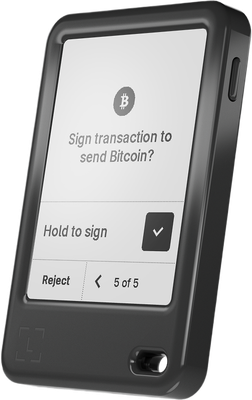
The Ledger Flex features a 2.84-inch E-Ink touchscreen — the largest display on any Ledger device to date and one of the largest in the consumer hardware wallet category. E-Ink provides excellent readability in bright light but has a noticeable refresh lag compared to LCD screens. Touch response is adequate but not as snappy as a smartphone display.
First-time setup takes approximately 10–15 minutes: device initialization, PIN creation, seed phrase recording (24 words displayed sequentially), and seed confirmation. The Ledger Livecompanion app is required for most operations and is available on Windows, macOS, Linux, iOS, and Android. Ledger Live is a full-featured app with portfolio tracking, buy/sell integrations, and app management for installing coin-specific firmware modules.
Daily use workflow for sending requires: opening Ledger Live, initiating a transaction, physically confirming address and amount on the Flex screen, and approving. The E-Ink screen makes address verification genuinely readable — a real improvement over the Nano S Plus's small OLED. NFC enables tap-to-connect with mobile devices without a cable, which is a practical convenience advantage over competitors like Trezor Safe 3 (no NFC) or Coldcard Mk4 (no NFC).
The learning curve is moderate. Beginners will find Ledger Live polished and guided. Advanced users may find the closed ecosystem and mandatory app installation per coin (limited device storage) frustrating. Trezor Suite offers a comparable desktop experience with open-source code, which some users will prefer on principle.
Usability / UX
The Ledger Flex supports 50 networks and approximately 15,000 tokens through Ledger Live and third-party integrations. Key L1 chains include Bitcoin, Ethereum, Solana, Avalanche, Polygon, and Cosmos. Bitcoin support includes native SegWit (bech32) and Taproot.
Third-party wallet compatibility is broad: MetaMask hardware wallet integration works via USB, Electrum supports the Flex for Bitcoin via USB, and MyEtherWallet connects via USB or Bluetooth. WalletConnect is supported through Ledger Live's browser extension and mobile app, enabling DeFi and NFT interactions. NFT display is available directly on the E-Ink screen — a feature absent on Trezor Safe 3's small display.
Limitations exist: QR-code-based air-gapped signing is not supported, which rules out workflows used by Passport (Foundation) or Coldcard with PSBT over QR. Sparrow Wallet integration works via USB but lacks the air-gap option available with Coldcard Mk4. WebUSB is not supported, narrowing browser-based integrations. Multisig support is described as basic — Ledger Live handles simple multisig but lacks the advanced PSBT multisig coordinator features found in Coldcard's native tooling or Specter Desktop integrations with Trezor.
Ecosystem & integrations
Ledger does not require account registration to use the Flex device itself — the hardware functions without a Ledger account. However, Ledger Live requires an email address for certain features (buy/sell, Ledger Recover) and collects anonymized usage analytics by default. An opt-out toggle exists in Ledger Live settings, but telemetry is on by default — a privacy-unfriendly default compared to Trezor Suite, which also collects analytics but is open source and auditable.
Ledger Live communicates with Ledger's servers for balance lookups and transaction broadcasting, meaning Ledger's infrastructure sees your xpub-derived addresses unless you configure a custom node. There is no native Tor integration in Ledger Live. Using a VPN is possible but not officially documented or supported. Running a personal Bitcoin or Ethereum node and pointing Ledger Live at it is technically possible but requires manual configuration and is not beginner-accessible.
CoinJoin is not supported natively. Coldcard Mk4 with Sparrow Wallet supports Whirlpool CoinJoin; Passport with Envoy does not either — so the Flex is not uniquely weak here, but privacy-focused Bitcoin users will find Coldcard the only hardware wallet with a genuine CoinJoin workflow. The 2020 Ledger customer database breach (272,000 customer records leaked) is a historical privacy concern specific to Ledger as a company, not the device hardware.
Privacy
The Ledger Flex retails at $249 USD. Direct competitors at lower price points include the Trezor Safe 3 at $79, the Ledger Nano X at $149, and the Foundation Passport at $199. The only hardware wallet priced higher in the mainstream market is the Ledger Stax at $399, which adds a larger curved E-Ink display but is otherwise functionally similar.
The $249 price buys you: EAL6+ secure element (the highest available), NFC connectivity, a 2.84-inch touchscreen, Bluetooth, and USB-C. Compared to the Trezor Safe 3 at $79, you pay $170 more for a better secure element certification (EAL6+ vs EAL4+), a larger touch display, NFC, and Bluetooth — but you lose open-source firmware and reproducible builds. That tradeoff is real and not trivial for security-conscious users.
Compared to the Passport at $199, the Flex costs $50 more, adds NFC and Bluetooth, but loses air-gapped QR signing, open-source firmware, and the Passport's fully open hardware design.
Best value for: Users who prioritize EAL6+ hardware security, want NFC/Bluetooth mobile convenience, and are comfortable with Ledger's closed firmware.
Look elsewhere if: You want open-source firmware (Trezor, Passport, Coldcard), air-gapped operation (Coldcard, Passport), or are budget-constrained (Trezor Safe 3 at $79 covers most users' needs).
At $249, the Flex is not poor value — but it asks a premium that is only justified if the EAL6+ certification and touchscreen UX are specifically important to you.
Price & value
The Ledger Flex is a premium, well-rounded hardware wallet that earns its $249 price tag through a combination of best-in-class secure element hardware and a genuinely pleasant touchscreen experience — though its closed-source firmware remains a meaningful caveat for security purists.
Buy this wallet if:
You want a polished, everyday-carry device with Bluetooth and NFC connectivity for seamless mobile use on both iOS and Android without sacrificing an EAL6+ certified secure element.
You manage a broad, diverse portfolio — support for 50+ networks and 15,000+ tokens means you are unlikely to hit a compatibility wall as you explore new chains.
You value a large, readable E-Ink touchscreen that makes transaction verification genuinely easy, especially compared to the cramped buttons and tiny displays found on older-generation devices.
Skip this wallet if:
Open-source, auditable firmware is non-negotiable for your threat model. The Ledger Flex runs proprietary closed-source software with no reproducible builds — consider the Foundation Passport or Coldcard Mk4 ($149) instead, both of which offer fully open and verifiable code.
You are a Bitcoin-only user on a tighter budget. At $249, the Flex charges a significant premium for features like NFC and a color touchscreen that add little value if you only hold BTC — the Coldcard Mk4 at $149 delivers superior Bitcoin-specific security for considerably less.
You need air-gapped, QR-code-based signing with zero wireless exposure. The Flex has no QR signing capability; the Keystone 3 Pro ($169) is purpose-built for that workflow.
Comparing your options: If choosing between the Ledger Flex ($249) and the Ledger Nano X (~$149), the Flex's larger E-Ink touchscreen and NFC support justify the premium only if you actively use mobile NFC payments or find touch navigation meaningfully more comfortable. If choosing between the Ledger Flex ($249) and the Trezor Safe 5 (~$169), the Flex wins on secure element certification (EAL6+ vs. no dedicated secure element), but the Safe 5 counters with fully open-source firmware — a trade-off that depends entirely on where you place your trust.
The Ledger Flex is a strong, feature-rich device that scores well across connectivity, display quality, and hardware security. Keep the closed-source firmware limitation in mind, and it lands as a confident recommendation for mainstream users who prioritize usability and broad asset support over full code transparency.
✓ Our Verdict
The Ledger Flex is a premium, well-rounded hardware wallet that earns its $249 price tag through a combination of best-in-class secure element hardware and a genuinely pleasant touchscreen experience — though its closed-source firmware remains a meaningful caveat for security purists.
Buy this wallet if:
You want a polished, everyday-carry device with Bluetooth and NFC connectivity for seamless mobile use on both iOS and Android without sacrificing an EAL6+ certified secure element.
You manage a broad, diverse portfolio — support for 50+ networks and 15,000+ tokens means you are unlikely to hit a compatibility wall as you explore new chains.
You value a large, readable E-Ink touchscreen that makes transaction verification genuinely easy, especially compared to the cramped buttons and tiny displays found on older-generation devices.
Skip this wallet if:
Open-source, auditable firmware is non-negotiable for your threat model. The Ledger Flex runs proprietary closed-source software with no reproducible builds — consider the Foundation Passport or Coldcard Mk4 ($149) instead, both of which offer fully open and verifiable code.
You are a Bitcoin-only user on a tighter budget. At $249, the Flex charges a significant premium for features like NFC and a color touchscreen that add little value if you only hold BTC — the Coldcard Mk4 at $149 delivers superior Bitcoin-specific security for considerably less.
You need air-gapped, QR-code-based signing with zero wireless exposure. The Flex has no QR signing capability; the Keystone 3 Pro ($169) is purpose-built for that workflow.
Comparing your options: If choosing between the Ledger Flex ($249) and the Ledger Nano X (~$149), the Flex's larger E-Ink touchscreen and NFC support justify the premium only if you actively use mobile NFC payments or find touch navigation meaningfully more comfortable. If choosing between the Ledger Flex ($249) and the Trezor Safe 5 (~$169), the Flex wins on secure element certification (EAL6+ vs. no dedicated secure element), but the Safe 5 counters with fully open-source firmware — a trade-off that depends entirely on where you place your trust.
The Ledger Flex is a strong, feature-rich device that scores well across connectivity, display quality, and hardware security. Keep the closed-source firmware limitation in mind, and it lands as a confident recommendation for mainstream users who prioritize usability and broad asset support over full code transparency.
Ready to buyLedger Flex?
We may earn a commission if you purchase through our links. This doesn't affect our editorial independence.
Impermanent loss happens when asset prices in a liquidity pool diverge from external markets, reducing the value of liquidity providers' holdings compared to simply holding the assets.
EAL Certification (Evaluation Assurance Level) from Common Criteria rates the security of hardware components, like secure chips in crypto hardware wallets. Higher levels, such as EAL5+ or EAL6+, indicate stronger resistance to attacks.
Secure Boot is a security feature that ensures only trusted software runs on a device by verifying its integrity during startup, preventing unauthorized code execution in crypto systems.
Reproducible Builds refer to the process where the same source code consistently produces identical binary outputs, ensuring verifiable and trustworthy software in blockchain and crypto projects.
Firmware Attestation is the process of verifying the authenticity of a device's firmware to ensure it has not been tampered with, commonly used in hardware wallets for security.
BIP39 is a standard for generating mnemonic seed phrases that are used to create deterministic wallets and securely back up cryptocurrency private keys.
A backup in cryptocurrency is a secure copy of a wallet's seed phrase or private keys. It enables recovery of funds if the original wallet is lost or damaged.
Shamir Secret Sharing (SSS) divides a secret, like a crypto wallet seed, into multiple shares. A threshold number of shares reconstructs it, enhancing security as in SLIP-39 backups.
A Recovery Card is a physical card or sheet for backing up a cryptocurrency wallet's seed phrase, enabling recovery if the original wallet is lost or damaged.
Recovery is the process of restoring access to a cryptocurrency wallet using its seed phrase or mnemonic backup if the original wallet is lost or inaccessible.
A passphrase is an additional security layer for cryptocurrency wallets, acting as a 25th word in the BIP39 seed phrase, protecting access to hidden wallets.
A touchscreen display is a screen that allows users to interact with a device by touching the surface, commonly used in hardware wallets for easy navigation and transaction confirmation.
Vendor Backup is a service by hardware wallet manufacturers that securely stores encrypted seed phrase shards with third parties, enabling recovery without self-custody of the full seed.
Coldcard is an air-gapped hardware wallet for Bitcoin, made by Coinkite, that stores private keys offline and signs transactions without internet exposure.
A block confirmation is the process of verifying a new block in the blockchain network, confirming its validity and preventing double-spending or fraud.
Ledger Live is a software application that manages cryptocurrency assets and interacts with Ledger hardware wallets for secure transactions and portfolio management.
A companion app is a software application used to manage and interact with cryptocurrency wallets or blockchain networks, typically offering features like transactions and security controls.
Telemetry in cryptocurrency and blockchain refers to the automatic collection and transmission of anonymous usage data, metrics, and error reports from wallets or nodes to improve software.
UTXO (Unspent Transaction Output) is a unit of cryptocurrency from a previous transaction that remains unspent and serves as input for new transactions in blockchains like Bitcoin.
Address Verification confirms the receiving address shown on a hardware wallet's screen matches the one on the computer or app, preventing malware from altering it.
Bitcoin (BTC) is the first decentralized cryptocurrency, launched in 2009. It uses blockchain technology for secure, peer-to-peer digital transactions without intermediaries.
Ethereum is a decentralized blockchain platform that enables smart contracts and decentralized applications (dApps). Its native cryptocurrency is Ether (ETH).
Solana is a high-performance layer-1 blockchain platform that enables fast, low-cost transactions using Proof of History and Proof of Stake. Its native token is SOL.
Avalanche (AVAX) is a scalable layer-1 blockchain platform that achieves high throughput and sub-second transaction finality using its novel proof-of-stake consensus.
Polygon is a layer-2 scaling solution for Ethereum that enables faster, cheaper transactions via its Proof-of-Stake sidechain. Native token: MATIC (also called Polygon PoS).
Cosmos is a blockchain ecosystem enabling interoperable chains via the Cosmos SDK and IBC protocol. The Cosmos Hub serves as its central chain with the ATOM token.
SegWit (Segregated Witness) is a Bitcoin upgrade that moves transaction signatures to a separate data structure, increasing block capacity and enabling efficient scaling solutions like the Lightning Network.
Taproot (BIP 341) is a Bitcoin upgrade that introduces Schnorr signatures and Tapscript, enhancing privacy by making complex scripts look like simple payments and improving efficiency.
Electrum is a lightweight Bitcoin wallet that allows users to store, send, and receive Bitcoin securely. It is known for its speed and low resource usage.
WalletConnect is a protocol that enables secure communication between decentralized applications (dApps) and mobile wallets through QR code scanning or deep linking.
DeFi (Decentralized Finance) refers to a set of financial services, such as lending and trading, built on blockchain technology without traditional intermediaries like banks.
An NFT (Non-Fungible Token) is a unique digital asset stored on a blockchain, representing ownership of a specific item, such as artwork, music, or virtual goods.
Offline Signing refers to signing cryptocurrency transactions on a device that is not connected to the internet, ensuring private keys remain secure from online threats.
PSBT (Partially Signed Bitcoin Transaction) is a Bitcoin transaction format that allows multiple parties to sign a transaction incrementally before finalizing it.
WebUSB is a browser API that lets web apps communicate directly with USB-connected hardware wallets for secure crypto transactions without plugins or native apps.
Multisig (multi-signature) is a security feature that requires multiple private keys to authorize a transaction, enhancing protection against unauthorized access in blockchain networks.
Specter is a Bitcoin hardware wallet solution designed for advanced users, offering secure storage through a customizable, self-hosted setup with options like Specter Desktop and Specter DIY.
XPUB is an extended public key (xpub) in hierarchical deterministic (HD) wallets. It derives child public keys and addresses from a master public key without exposing private keys.
CoinJoin is a privacy technique in cryptocurrency where multiple users combine their transactions, making it harder to trace individual senders and receivers.
NFC Connectivity in cryptocurrency enables contactless transactions using near-field communication, allowing users to sign or authorize actions by tapping their device to a reader.
HODL is cryptocurrency slang for holding assets long-term despite price volatility, rather than selling. It originated from a 2013 forum post misspelling 'hold' as 'I AM HODLING.'
Ledger Flex uses a certified Secure Element chip to store private keys in tamper-resistant hardware. Even if the device's software were compromised, the Secure Element isolates your keys from extraction. The device has been independently security audited.
What if Ledger goes out of business?
Your seed phrase follows the BIP39 standard, meaning you can recover your funds using any compatible wallet — you are not locked into Ledger's ecosystem.
What if I lose my Ledger Flex?
Your cryptocurrency is stored on the blockchain, not on the device. If you lose your Ledger Flex, you can recover full access using your seed phrase on any compatible wallet.
How long will Ledger Flex receive security updates?
Ledger actively maintains Ledger Flex with regular firmware updates.
Is the Ledger Flex safe to use?
The Ledger Flex is built around a ST33K1M5 secure element chip rated EAL6+ — one of the highest security certifications available in consumer hardware wallets. Private keys never leave this chip. The device also features secure boot and a genuine-check mechanism to detect tampering before use.
The main caveat is that Ledger's firmware and software are not open source, so independent security researchers cannot fully audit the codebase. For most users the hardware security is excellent, but those requiring full transparency may prefer open-source alternatives.
Is the Ledger Flex worth the $249 price?
At $249, the Ledger Flex sits at the premium end of the hardware wallet market. You get a large 2.84-inch E-Ink touchscreen, Bluetooth, NFC, USB-C, support for over 15,000 tokens across 50+ networks, and an EAL6+ secure element — features that justify the cost for active crypto users managing diverse portfolios.
If you only hold Bitcoin or a handful of assets, a cheaper Ledger Nano X (~$149) covers the basics. The Flex is best value for users who want a flagship experience with modern connectivity and a large display.
Ledger Flex vs Ledger Nano X: what's the difference?
Both devices share Ledger's security foundation, but differ significantly in hardware:
Display: Flex has a 2.84-inch E-Ink touchscreen; Nano X has a small OLED with two buttons.
Secure element: Flex uses EAL6+ (ST33K1M5); Nano X uses EAL5+.
Connectivity: Flex adds NFC on top of Bluetooth and USB; Nano X lacks NFC.
Choose the Nano X if budget matters. Choose the Flex if you want a better screen, stronger chip, and NFC tap-to-sign capability.
How many coins does the Ledger Flex support?
The Ledger Flex supports over 15,000 tokens across 50+ blockchain networks, managed through the Ledger Live app on Windows, macOS, Linux, iOS, and Android. This includes major networks like Bitcoin, Ethereum, Solana, Polygon, and BNB Chain, plus thousands of ERC-20 and compatible tokens.
Coin support is expanded via installable apps on the device — you install only the networks you need, which keeps the device storage lean. Always verify your specific asset is supported in Ledger Live before purchasing.
What happened with the Ledger data breach and should I still trust the company?
In 2020, Ledger suffered a customer database breach exposing names, email addresses, and physical addresses of ~270,000 customers — leading to widespread phishing attacks. Importantly, no funds were stolen and no private keys were compromised, as those never leave the secure element.
In 2023, Ledger also faced backlash over its optional Ledger Recover service, which raised concerns about seed phrase handling. The service is opt-in and does not affect standard wallet operation.
The hardware security remains strong, but users should stay vigilant against phishing and never share their 24-word recovery phrase with anyone.
Does the Ledger Flex support Bluetooth and NFC, and are they secure?
Yes — the Ledger Flex supports Bluetooth, NFC, and USB-C. Bluetooth enables wireless connection to the Ledger Live mobile app on iOS and Android. NFC allows tap-to-sign interactions with compatible apps.
Critically, private keys never travel over these wireless channels. Only signed transaction data is transmitted; the signing itself always happens inside the secure element. Bluetooth and NFC can be disabled if preferred. For users concerned about wireless attack surfaces, USB-C remains available as a wired alternative.
How do I set up the Ledger Flex and back it up?
Setup takes roughly 10–15 minutes via the Ledger Live app:
Power on the device and follow the on-screen touchscreen prompts.
Generate a new wallet — the Flex displays a 24-word BIP39 seed phrase on-screen for you to write down offline.
Store that phrase securely; it is your only recovery method if the device is lost or damaged.
Optionally add a BIP39 passphrase for an extra layer of security.
Note: Shamir Secret Sharing is not supported. The sole backup method is the 24-word phrase, so physical security of that backup is critical.
Some links on this page are affiliate links. If you purchase through them, I may earn a commission at no additional cost to you. This helps support the site and allows me to continue creating detailed, independent reviews.
Our testing methodology is evolving. Ratings and assessments will be refined as we improve our scoring framework to reflect the most accurate results.
Ready to get Ledger Flex?
Long-term support • Secure Element • Security audited • Bluetooth • NFC