Air-gapped hardware wallet supporting 85 networks at $169, relying entirely on QR codes for transaction signing with no USB or Bluetooth connectivity. Closed-source firmware and unspecified secure element details limit independent verification.
The Ellipal Titan 2 is a competent air-gapped wallet with a solid security foundation, though its closed-source firmware is a meaningful trust compromise. Its EAL5+ secure element and QR-only connectivity eliminate USB/Bluetooth attack surfaces entirely, supporting 85 networks and 6,000 tokens. Developers and security-focused users who require open-source or reproducible builds should look elsewhere.
The Ellipal Titan 2 uses a secure element rated at EAL5+ — the same certification tier as the Ledger Nano X's ST33 chip and above the EAL4+ found in Trezor Safe 3's Infineon SLB 9670. The specific secure element model is not publicly disclosed by Ellipal — vendor claims EAL5+ certification, but independent chip identification has not been published by third-party researchers.
The firmware is closed source, with no reproducible builds and no open audit trail. Firmware updates are delivered via SD card or QR code — there is no USB update path since the device has no USB data connection. Ellipal claims firmware is signed, but the signing key infrastructure and verification process are not publicly documented.
The device implements a genuine check at boot — vendor claims the secure element validates firmware integrity on startup. Supply chain verification relies on a tamper-evident seal and an in-app authenticity scan, but no cryptographic proof-of-origin comparable to Coldcard's supply chain verification is available.
The Titan 2's primary security claim is its air-gap via QR code only — no USB, Bluetooth, or NFC attack surface. This is a meaningful physical isolation advantage over the Ledger Nano X, which exposes Bluetooth. However, the closed firmware means the QR parsing stack cannot be independently audited for vulnerabilities. No public CVEs are on record for the Titan 2 specifically, but the closed-source posture makes that absence less reassuring than it would be for an open-source device like the Passport 2.
SecurityKey Factor
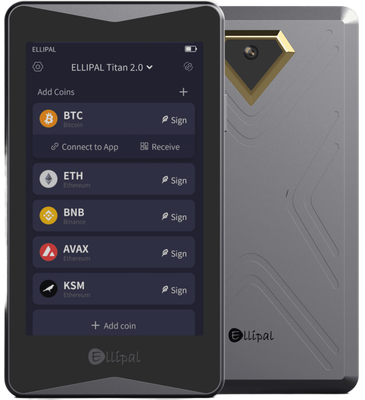
The Ellipal Titan 2 generates a 24-word BIP39 mnemonic on-device during setup. The seed is displayed on the 4-inch IPS touchscreen and must be written down manually — no metal backup plate is included in the box at $169, unlike the Cryptosteel Capsule bundles some competitors offer.
Passphrase support is present, allowing hidden wallet derivation via BIP39 passphrase entry directly on the device. This is a meaningful feature for plausible deniability.
Shamir Secret Sharing (SLIP39) is not supported. Users who want multi-share backup redundancy will need to look at Trezor Model T or Keystone Pro, both of which implement SLIP39 natively. The only backup method here is the standard mnemonic phrase on paper or a third-party metal solution purchased separately.
Recovery on a new Ellipal Titan 2 requires entering the 24-word phrase via the touchscreen keyboard — functional but slower than Coldcard's physical keypad entry for long passphrases. Critically, the BIP39 seed is fully portable: a lost or destroyed Titan 2 can be recovered on any BIP39-compatible device, including Trezor, Ledger, or software wallets like Electrum. No proprietary recovery format lock-in exists, which is a baseline expectation but worth confirming explicitly.
The absence of Shamir and the single-method backup approach are the main weaknesses here relative to the Keystone Pro at a similar price point.
Recovery & backups
The Titan 2 features a 4-inch IPS touchscreen — the largest display of any hardware wallet in its price range. By comparison, the Keystone Pro uses a 4-inch touchscreen as well, while the Ledger Nano X uses a small 128×64 OLED with two physical buttons. The larger screen makes QR code scanning and transaction detail review noticeably easier.
First-time setup takes approximately 10–15 minutes: power on, generate seed, record 24 words, set PIN. The touchscreen interface is intuitive enough that non-technical users can complete setup without consulting documentation. Daily use involves scanning QR codes between the Titan 2 and the Ellipal companion app (iOS and Android only — no desktop support for Windows, macOS, or Linux).
The sending workflow: initiate transaction in the app → scan animated QR from app to device → verify details on device screen → sign → scan signed QR back to app → broadcast. This is 2–3 more steps than a USB-connected device like the Trezor Model One, which is the trade-off for air-gap isolation. Users accustomed to plug-and-play USB wallets will find the QR workflow slower initially.
The companion app supports iOS and Android but no desktop platforms — a significant limitation for users who manage portfolios primarily from a computer. Keystone Pro integrates with MetaMask desktop and Sparrow Wallet via QR; Ellipal's desktop compatibility is substantially weaker. The app UI is polished and receives regular updates, but its closed nature means no community-built integrations.
Usability / UX
The Ellipal Titan 2 supports 85 networks and over 6,000 tokens, covering major L1s including Bitcoin, Ethereum, BNB Chain, Solana, Tron, Polygon, Avalanche, and Cosmos-ecosystem chains. For most retail users holding mainstream assets, coverage is adequate.
Third-party wallet integration is the significant weak point. The Titan 2 does not natively integrate with MetaMask desktop, Sparrow Wallet, or Electrum — all of which support Keystone Pro and Passport 2 via QR-based PSBT. Ellipal operates within its own closed app ecosystem. There is no published PSBT-over-QR standard integration, limiting advanced Bitcoin users who rely on Sparrow for coin control and UTXO management.
WalletConnect support is handled through the Ellipal app rather than direct hardware integration, meaning DeFi interactions are mediated by the companion app rather than a direct hardware-to-dApp connection. NFT display is supported within the app for Ethereum-based assets — vendor claims this, not independently stress-tested across all 6,000 tokens.
For multi-chain retail holders who stay within the Ellipal app, the ecosystem is functional. For Bitcoin-focused users or anyone wanting Sparrow/Electrum compatibility, the Keystone Pro ($169) or Passport 2 ($199) are materially better choices with documented open-standard integrations.
Ecosystem & integrations
The Ellipal companion app requires no account registration to use — a baseline privacy positive. However, the app connects to Ellipal's servers to broadcast transactions and fetch balance data, meaning IP addresses and transaction patterns are exposed to Ellipal's infrastructure by default. There is no documented Tor or custom node support in the companion app, unlike Coldcard which pairs with Sparrow and supports Tor-routed Electrum connections natively.
Telemetry policy is not clearly disclosed in Ellipal's public documentation — whether usage data is collected and whether opt-out is possible is not independently verified. The closed-source app makes third-party audit of data collection impossible.
The device itself is fully air-gapped and can sign transactions offline indefinitely — the hardware generates no network traffic. The privacy exposure is entirely in the companion app layer. CoinJoin is not supported; there is no Whirlpool or JoinMarket integration, and no Sparrow compatibility rules out that path entirely.
Compared to Coldcard MK4 ($239), which supports fully sovereign Bitcoin operation via Sparrow over Tor with no mandatory companion app, the Titan 2's privacy posture is meaningfully weaker. Passport 2 similarly allows pairing with privacy-respecting Bitcoin software. The Titan 2 is adequate for users not prioritizing network-level privacy, but it is not a privacy-first device.
Privacy
The Ellipal Titan 2 retails at $169 USD, placing it in direct competition with the Keystone Pro ($169) and within range of the Passport 2 ($199) and Coldcard MK4 ($239).
At $169, the Keystone Pro offers a nearly identical air-gap QR workflow but adds open-source firmware, Sparrow Wallet integration, MetaMask desktop compatibility, and PSBT support — making it the stronger technical choice at the same price for most security-conscious users. The Titan 2's advantage over Keystone Pro is its larger brand recognition in Asian markets and a marginally more polished app UI.
Against the Ledger Nano X ($149), the Titan 2 costs $20 more but eliminates Bluetooth attack surface and adds a significantly larger screen. For users specifically concerned about wireless attack vectors, that premium is justified.
The Passport 2 at $199 adds open-source firmware and superior Bitcoin-specific tooling for $30 more — worth it for Bitcoin-focused users. The Coldcard MK4 at $239 is the professional Bitcoin security tool and serves a different audience entirely.
Best fit for Titan 2: Multi-chain retail holders who want air-gap security without USB/Bluetooth, use mobile-first, and hold assets across 85+ networks.
Should pay less: Bitcoin-only users — a Coldcard or Passport 2 serves them better despite higher cost.
Should consider alternatives: Anyone needing desktop wallet integration or open-source firmware verification — Keystone Pro at the same $169 is the direct upgrade.
Price & value
The Ellipal Titan 2 is a genuinely compelling air-gapped hardware wallet that makes a strong case for QR-only communication, though its closed-source firmware and premium price tag will give security purists reason to pause.
Buy this wallet if:
You are a security-conscious user who wants a completely air-gapped device — no USB, no Bluetooth, no NFC — and are comfortable with QR code transaction signing as your daily workflow.
You hold assets across a wide range of blockchains and need broad multi-chain coverage, with support for 85 networks and over 6,000 tokens without juggling multiple devices.
You prioritize physical durability and a premium feel; the aluminum alloy build and large 4-inch IPS touchscreen make it one of the more robust and user-friendly devices in its class.
Skip this wallet if:
Open-source firmware and reproducible builds are non-negotiable for you — the Ellipal Titan 2 is fully closed-source. Consider the Foundation Passport 2 (~$199) instead, which offers a similarly air-gapped QR workflow with fully open-source, auditable code.
You need desktop software support on Windows, macOS, or Linux. The Titan 2 is mobile-only (iOS and Android), which is a real limitation for users who manage portfolios from a computer. The Ledger Flex (~$249) covers both mobile and desktop environments.
You want Shamir Secret Sharing or advanced multisig configurations for institutional-grade key management — neither is supported here.
If choosing between the Ellipal Titan 2 and the Coldcard Mk4 (~$157): the Coldcard wins on open-source credibility and Bitcoin-native advanced features, but the Titan 2 is far more approachable for beginners and supports vastly more chains. If choosing between the Ellipal Titan 2 and the Keystone 3 Pro (~$149): both are QR-based air-gapped wallets, but the Keystone 3 Pro offers open-source firmware and a similar feature set at a lower price, making it the stronger value proposition for security-minded users.
The Ellipal Titan 2 earns its place as a solid mid-tier air-gapped wallet — refer to our full rating breakdown above to see exactly where it excels and where it falls short relative to the competition.
✓ Our Verdict
The Ellipal Titan 2 is a genuinely compelling air-gapped hardware wallet that makes a strong case for QR-only communication, though its closed-source firmware and premium price tag will give security purists reason to pause.
Buy this wallet if:
You are a security-conscious user who wants a completely air-gapped device — no USB, no Bluetooth, no NFC — and are comfortable with QR code transaction signing as your daily workflow.
You hold assets across a wide range of blockchains and need broad multi-chain coverage, with support for 85 networks and over 6,000 tokens without juggling multiple devices.
You prioritize physical durability and a premium feel; the aluminum alloy build and large 4-inch IPS touchscreen make it one of the more robust and user-friendly devices in its class.
Skip this wallet if:
Open-source firmware and reproducible builds are non-negotiable for you — the Ellipal Titan 2 is fully closed-source. Consider the Foundation Passport 2 (~$199) instead, which offers a similarly air-gapped QR workflow with fully open-source, auditable code.
You need desktop software support on Windows, macOS, or Linux. The Titan 2 is mobile-only (iOS and Android), which is a real limitation for users who manage portfolios from a computer. The Ledger Flex (~$249) covers both mobile and desktop environments.
You want Shamir Secret Sharing or advanced multisig configurations for institutional-grade key management — neither is supported here.
If choosing between the Ellipal Titan 2 and the Coldcard Mk4 (~$157): the Coldcard wins on open-source credibility and Bitcoin-native advanced features, but the Titan 2 is far more approachable for beginners and supports vastly more chains. If choosing between the Ellipal Titan 2 and the Keystone 3 Pro (~$149): both are QR-based air-gapped wallets, but the Keystone 3 Pro offers open-source firmware and a similar feature set at a lower price, making it the stronger value proposition for security-minded users.
The Ellipal Titan 2 earns its place as a solid mid-tier air-gapped wallet — refer to our full rating breakdown above to see exactly where it excels and where it falls short relative to the competition.
Ready to buyEllipal Titan 2?
We may earn a commission if you purchase through our links. This doesn't affect our editorial independence.
Impermanent loss happens when asset prices in a liquidity pool diverge from external markets, reducing the value of liquidity providers' holdings compared to simply holding the assets.
EAL Certification (Evaluation Assurance Level) from Common Criteria rates the security of hardware components, like secure chips in crypto hardware wallets. Higher levels, such as EAL5+ or EAL6+, indicate stronger resistance to attacks.
Reproducible Builds refer to the process where the same source code consistently produces identical binary outputs, ensuring verifiable and trustworthy software in blockchain and crypto projects.
Firmware Attestation is the process of verifying the authenticity of a device's firmware to ensure it has not been tampered with, commonly used in hardware wallets for security.
BIP39 is a standard for generating mnemonic seed phrases that are used to create deterministic wallets and securely back up cryptocurrency private keys.
A metal backup is a durable metal plate or device engraved with a cryptocurrency wallet's seed phrase, providing fireproof and waterproof protection for offline key storage.
A passphrase is an additional security layer for cryptocurrency wallets, acting as a 25th word in the BIP39 seed phrase, protecting access to hidden wallets.
A hidden wallet conceals a secondary cryptocurrency wallet behind an additional passphrase on the same seed, providing plausible deniability against coercion.
Plausible Deniability refers to the ability to deny knowledge or possession of cryptocurrency by using techniques like decoy wallets or hidden volumes, ensuring privacy under duress.
Shamir Secret Sharing (SSS) divides a secret, like a crypto wallet seed, into multiple shares. A threshold number of shares reconstructs it, enhancing security as in SLIP-39 backups.
A backup in cryptocurrency is a secure copy of a wallet's seed phrase or private keys. It enables recovery of funds if the original wallet is lost or damaged.
Recovery is the process of restoring access to a cryptocurrency wallet using its seed phrase or mnemonic backup if the original wallet is lost or inaccessible.
Electrum is a lightweight Bitcoin wallet that allows users to store, send, and receive Bitcoin securely. It is known for its speed and low resource usage.
A companion app is a software application used to manage and interact with cryptocurrency wallets or blockchain networks, typically offering features like transactions and security controls.
QR Code Signing is a method used in cryptocurrency transactions where a QR code is generated to confirm and sign a transaction, enhancing security and user convenience.
Bitcoin (BTC) is the first decentralized cryptocurrency, launched in 2009. It uses blockchain technology for secure, peer-to-peer digital transactions without intermediaries.
Ethereum is a decentralized blockchain platform that enables smart contracts and decentralized applications (dApps). Its native cryptocurrency is Ether (ETH).
BNB Chain is a high-performance blockchain network developed by Binance, formerly Binance Smart Chain (BSC). It supports smart contracts, DeFi, and uses BNB as its native token.
Solana is a high-performance layer-1 blockchain platform that enables fast, low-cost transactions using Proof of History and Proof of Stake. Its native token is SOL.
TRON is a blockchain platform and cryptocurrency (TRX) designed for high-throughput decentralized applications, especially in content sharing and entertainment.
Polygon is a layer-2 scaling solution for Ethereum that enables faster, cheaper transactions via its Proof-of-Stake sidechain. Native token: MATIC (also called Polygon PoS).
Avalanche (AVAX) is a scalable layer-1 blockchain platform that achieves high throughput and sub-second transaction finality using its novel proof-of-stake consensus.
Cosmos is a blockchain ecosystem enabling interoperable chains via the Cosmos SDK and IBC protocol. The Cosmos Hub serves as its central chain with the ATOM token.
PSBT (Partially Signed Bitcoin Transaction) is a Bitcoin transaction format that allows multiple parties to sign a transaction incrementally before finalizing it.
Coin Control is a feature that allows users to manually select which unspent transaction outputs (UTXOs) to use in a transaction, giving more control over privacy and fees.
UTXO (Unspent Transaction Output) is a unit of cryptocurrency from a previous transaction that remains unspent and serves as input for new transactions in blockchains like Bitcoin.
WalletConnect is a protocol that enables secure communication between decentralized applications (dApps) and mobile wallets through QR code scanning or deep linking.
DeFi (Decentralized Finance) refers to a set of financial services, such as lending and trading, built on blockchain technology without traditional intermediaries like banks.
An NFT (Non-Fungible Token) is a unique digital asset stored on a blockchain, representing ownership of a specific item, such as artwork, music, or virtual goods.
Coldcard is an air-gapped hardware wallet for Bitcoin, made by Coinkite, that stores private keys offline and signs transactions without internet exposure.
Telemetry in cryptocurrency and blockchain refers to the automatic collection and transmission of anonymous usage data, metrics, and error reports from wallets or nodes to improve software.
CoinJoin is a privacy technique in cryptocurrency where multiple users combine their transactions, making it harder to trace individual senders and receivers.
HODL is cryptocurrency slang for holding assets long-term despite price volatility, rather than selling. It originated from a 2013 forum post misspelling 'hold' as 'I AM HODLING.'
Multisig (multi-signature) is a security feature that requires multiple private keys to authorize a transaction, enhancing protection against unauthorized access in blockchain networks.
An air-gapped wallet is a cryptocurrency wallet that remains completely offline, disconnected from the internet, to prevent exposure to online threats and attacks.
Ellipal Titan 2 uses a certified Secure Element chip to store private keys in tamper-resistant hardware. Even if the device's software were compromised, the Secure Element isolates your keys from extraction.
What if Ellipal goes out of business?
Your seed phrase follows the BIP39 standard, meaning you can recover your funds using any compatible wallet — you are not locked into Ellipal's ecosystem.
What if I lose my Ellipal Titan 2?
Your cryptocurrency is stored on the blockchain, not on the device. If you lose your Ellipal Titan 2, you can recover full access using your seed phrase on any compatible wallet.
How long will Ellipal Titan 2 receive security updates?
Check Ellipal's website for the latest firmware update schedule.
Is the Ellipal Titan 2 safe?
The Ellipal Titan 2 is designed with a strong security architecture. It features an EAL5+ certified secure element, secure boot, and genuine device verification. Its most distinctive security feature is complete air-gap isolation — it has no USB, Bluetooth, or NFC connectivity, communicating exclusively via QR codes. This eliminates remote attack vectors entirely. However, the firmware is closed-source, meaning the code cannot be independently audited by the security community, which is a meaningful trade-off compared to open-source alternatives like Trezor.
Ellipal Titan 2 vs Coldcard: which is better?
Both are air-gapped wallets, but they target different users:
Ellipal Titan 2 offers a large 4-inch IPS touchscreen, supports 85+ networks and 6,000+ tokens, and works with iOS and Android — making it more beginner-friendly and versatile for altcoin holders.
Coldcard is Bitcoin-only, fully open-source with reproducible builds, and favored by advanced Bitcoin users who prioritize auditability over convenience.
If you hold diverse crypto assets and want ease of use, Ellipal wins. If you are a Bitcoin purist who values open-source transparency above all, Coldcard is the stronger choice.
How many coins does the Ellipal Titan 2 support?
The Ellipal Titan 2 supports 85+ blockchain networks and over 6,000 tokens, including major assets like Bitcoin, Ethereum, BNB, Solana, and a wide range of ERC-20 and BEP-20 tokens. It is compatible with the Ellipal mobile app on both iOS and Android for portfolio management and transaction signing. Note that it does not connect to desktop operating systems such as Windows, macOS, or Linux — all interactions happen through the mobile app via QR code scanning.
What are the known concerns or vulnerabilities with the Ellipal Titan 2?
The primary concerns raised by the security community include:
Closed-source firmware: Neither the firmware nor the software is open-source or reproducible, so independent verification of security claims is not possible.
Past research findings: Earlier Ellipal models were shown to be susceptible to certain physical tampering attacks; Ellipal addressed these in subsequent hardware revisions.
No Shamir Secret Sharing: Recovery is limited to a standard 24-word BIP39 mnemonic, with no advanced backup schemes.
The air-gap design does significantly reduce remote attack surface, but closed-source code remains a legitimate concern for security-conscious users.
Is the Ellipal Titan 2 worth the $169 price?
At $169, the Ellipal Titan 2 sits in the premium hardware wallet tier. You get a durable aluminum alloy body, a large 4-inch touchscreen, a built-in battery, EAL5+ secure element, and broad multi-chain support — features that justify the price for users managing diverse portfolios. However, compared to the Ledger Nano X ($149) or Trezor Model T ($179), the closed-source firmware and lack of desktop compatibility may make it less compelling for users who prioritize auditability. It offers strong value specifically for mobile-first users who want true air-gap security without complexity.
How do I set up the Ellipal Titan 2?
Setup is straightforward and requires no computer:
Power on the device and follow the on-screen prompts on the 4-inch touchscreen.
Generate a new wallet — the device creates a 24-word BIP39 mnemonic seed offline. Write it down and store it securely.
Download the Ellipal app on iOS or Android and pair it with your device by scanning a QR code.
To sign transactions, the app generates a QR code you scan with the Titan 2, which returns a signed QR code — all without any wired or wireless connection.
The entire process typically takes under 10 minutes.
Can the Ellipal Titan 2 be used without a smartphone?
No — the Ellipal Titan 2 requires a smartphone running the Ellipal app (iOS or Android) to function fully. The device itself stores your keys and signs transactions in isolation, but you need the mobile app to broadcast transactions, check balances, and manage your portfolio. Since the Titan 2 has no USB, Bluetooth, NFC, or desktop software support, a compatible smartphone is the only interface available. This makes it less suitable for users who prefer desktop-based portfolio management or who do not use iOS or Android devices.
Some links on this page are affiliate links. If you purchase through them, I may earn a commission at no additional cost to you. This helps support the site and allows me to continue creating detailed, independent reviews.
Our testing methodology is evolving. Ratings and assessments will be refined as we improve our scoring framework to reflect the most accurate results.