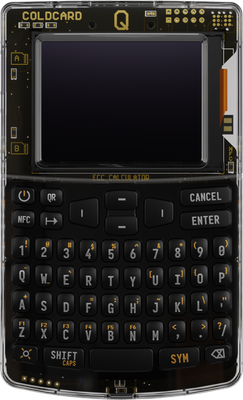
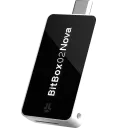
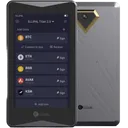
The Coldcard Q is a credible Bitcoin-only hardware wallet at $259.99, built around dual secure elements (ATECC608 + DS28C36B) with a 3.2-inch LCD, QR and NFC connectivity, and air-gapped signing support. Its strongest asset is a hardened, open-firmware security architecture with secure boot and genuine-check verification. Non-Bitcoin users have zero use case here, and the closed-source software layer warrants independent scrutiny before trusting it with significant funds.
The Coldcard Q uses two secure elements: a Microchip ATECC608 and a Maxim DS28C36B. Running dual secure elements in tandem is a design choice unique to Coldcard among consumer hardware wallets — the idea is that compromising one chip alone is insufficient to extract the seed. Neither chip has a publicly confirmed CC EAL5+ or EAL6+ certification; Coinkite does not advertise a specific Common Criteria level for either, which puts it behind the Ledger Flex (ST33K1M5, CC EAL6+) and the Trezor Safe 5 (EAL6+ Optiga Trust M) on certified silicon.
Firmware is open-source and Coinkite publishes reproducible build instructions, allowing independent verification of binary integrity — a meaningful advantage over Ledger's closed firmware. Secure boot is implemented, and firmware updates require physical confirmation on-device. Supply chain authenticity is handled via a factory-set bag number and a challenge-response verification against the secure elements at first boot — vendor claims this detects tampering, though independent audit of this process is limited.
No publicly disclosed remote code execution vulnerabilities exist as of mid-2025. A 2023 fault injection research paper targeted ATECC608-class chips generically, but no Coldcard-specific exploit was demonstrated. The physical attack surface is higher than Ledger's monolithic SE approach given the dual-chip architecture, though Coinkite argues the redundancy mitigates this. Compared to Foundation Passport, Coldcard Q's open firmware is comparable, but Passport uses a single STM32 + ATECC608A combo without the dual-SE design.
SecurityKey Factor
Seed generation is fully on-device, producing a 12 or 24-word BIP39 mnemonic. The Q supports optional extra entropy input from the user during generation — dice rolls can be entered directly via the full QWERTY keyboard, a workflow that is more ergonomic here than on the Mk4's numeric keypad. BIP39 passphrases (the "25th word") are supported, enabling hidden wallets with no on-device trace of the passphrase itself.
Shamir Secret Sharing (SLIP39) is not supported — a notable gap versus the Trezor Safe 3 and Safe 5, both of which implement SLIP39 natively. Users who want multi-share recovery must rely on external tools or manual splitting.
Backup options include standard paper seed recording and MicroSD-based encrypted backup. The MicroSD backup encrypts the seed using a PIN-derived key, so the card alone is not sufficient to restore — the PIN is also required. QR-based seed backup is also available. Restoring on a new Coldcard Q or Mk4 is straightforward: enter the 24 words or load the encrypted MicroSD. Restoring on a non-Coldcard device (e.g., Sparrow, Electrum) works via standard BIP39 import. If the device is lost, any BIP39-compatible wallet recovers funds. Compared to Foundation Passport, which also lacks SLIP39, the backup feature set is roughly equivalent, though Passport's microSD backup uses a different encryption scheme.
Recovery & backups
The Coldcard Q is physically the largest Coldcard to date: 120 × 75 × 22 mm, 93 g, with a 3.2-inch LCD and a full QWERTY keyboard plus number row. The screen is not touch-enabled; all navigation uses physical keys. Text is readable at normal distances, though the LCD is not as sharp or high-contrast as the e-ink display on the Foundation Passport 2.
First-time setup involves setting a PIN (with anti-phishing words), optionally adding a passphrase, and generating or importing a seed — realistically 10–20 minutes for a new user following the documentation. The QWERTY keyboard makes passphrase entry and dice-roll entropy input significantly faster than on the Mk4, which used a numeric grid.
Daily use for sending involves either USB connection to Sparrow/Electrum, NFC tap, or QR code scanning via the built-in camera — the Q has both a QR scanner and can display QR codes on-screen, enabling fully air-gapped PSBT signing without cables. The NFC feature allows one-tap interaction with compatible apps. There is no dedicated Coinkite mobile companion app with full wallet functionality; users rely on third-party software like Sparrow Wallet or Electrum.
The learning curve is steep for non-technical users. The menu system is deep and assumes familiarity with Bitcoin concepts. Compared to the Ledger Flex's touchscreen and Ledger Live app, the Q demands significantly more user effort — but that depth is intentional for its target audience of advanced Bitcoin users.
Usability / UX
The Coldcard Q supports Bitcoin only — no Ethereum, no altcoins, no tokens. This is a deliberate design constraint, not a technical limitation that will be patched. Users holding any asset other than BTC need a separate device.
Within the Bitcoin ecosystem, third-party compatibility is broad: Sparrow Wallet, Electrum, Specter Desktop, BlueWallet, and Nunchuk all support Coldcard via PSBT over USB, MicroSD, or QR. Multisig coordination is well-supported — Coldcard's implementation of BIP-45 and BIP-87 multisig is considered one of the most mature in the hardware wallet space, with explicit support for 2-of-3 and 3-of-5 quorums in Sparrow.
There is no WalletConnect support, no DeFi interaction, and no NFT capability — consistent with Bitcoin-only scope. No browser extension integration exists. Compared to Ledger Nano X (5,500+ tokens, WalletConnect via Ledger Live) or Trezor Safe 5 (1,000+ coins), the Q's single-network scope is a hard limitation for multi-asset holders. For Bitcoin-only users, the integration depth with open-source desktop wallets is among the strongest available.
Ecosystem & integrations
No account registration is required to use the Coldcard Q. The device ships without any pairing to Coinkite's servers, and no telemetry is transmitted during normal operation — the firmware is open-source and auditable on this point. The Q operates fully offline by default; USB connectivity to a host is optional and air-gapped QR/MicroSD workflows require zero network exposure from the device itself.
Tor and VPN compatibility depends on the companion software (Sparrow, Electrum), not the device — both support Tor natively, making a fully private Bitcoin node + Coldcard Q setup achievable without exposing transaction data to third parties.
CoinJoin is supported via Sparrow Wallet's Whirlpool integration and via the native Coldcard PSBT signing flow — the Q can sign CoinJoin transactions constructed by Sparrow without modification.
Compared to the Foundation Passport, privacy posture is nearly identical: no registration, open firmware, air-gapped capable. The Trezor Safe 5 requires no registration either but its closed secure element firmware is less auditable. Ledger's ecosystem historically required email registration for Ledger Live, making the Q meaningfully better for users who prioritize zero data exposure to the manufacturer.
Privacy
The Coldcard Q retails at $259.99 USD, making it the most expensive Coldcard variant and one of the pricier Bitcoin-only hardware wallets on the market. Direct comparisons:
Coldcard Mk4: $149.99 — same dual-SE security architecture, no QWERTY keyboard, no built-in QR camera, smaller screen
Foundation Passport 2: $199.00 — Bitcoin-only, open hardware, similar air-gapped workflow, no QWERTY keyboard
Trezor Safe 5: $169.00 — multi-asset, EAL6+ SE, touchscreen, SLIP39 support, not Bitcoin-only
Ledger Flex: $249.00 — multi-asset, EAL6+ SE, touchscreen, closed firmware
The $110 premium over the Mk4 buys the QWERTY keyboard, 3.2-inch screen, built-in QR scanner, and NFC. For users who regularly enter passphrases, sign complex multisig transactions, or prefer air-gapped QR workflows, those additions have concrete ergonomic value. For users who connect via USB and rarely type passphrases, the Mk4 at $149.99 delivers equivalent security at a lower cost.
The Q is best value for advanced Bitcoin-only users who run air-gapped setups or heavy multisig configurations. Multi-asset holders should not buy this device at any price — the Trezor Safe 5 at $169 covers that use case with better ecosystem breadth. Casual Bitcoin holders who want simplicity will find better UX-per-dollar in the Ledger Nano X at $149.
Price & value
The Coinkite Coldcard Q is an exceptionally capable Bitcoin-only hardware wallet that earns its $259.99 price tag for serious, security-conscious users — but its steep cost and singular focus make it a hard sell for the casual crypto holder.
Buy this wallet if you are a Bitcoin maximalist who demands the highest available security architecture. The dual secure elements (ATECC608 and DS28C36B), secure boot, open firmware, and air-gapped QR signing combine to form one of the most hardened signing environments available to retail users today.
Buy this wallet if you manage multisig setups or run advanced self-custody strategies. The Coldcard Q's multisig support is rated secure, and its large 3.2-inch LCD screen makes reviewing complex PSBT transactions far more practical than on smaller devices.
Buy this wallet if you prioritize fully air-gapped operation. The combination of QR code signing, NFC, and MicroSD backup means you can operate the device without ever touching a USB cable, dramatically reducing your attack surface.
Skip this wallet if you hold altcoins or need multi-chain support. The Coldcard Q supports exactly one network and zero tokens. Consider the Ledger Flex ($249) or Trezor Safe 5 ($169) instead, both of which support thousands of assets.
Skip this wallet if you are new to self-custody. The Coldcard Q's interface, terminology, and setup process assume a baseline of Bitcoin knowledge. A Trezor Safe 3 ($79) or Ledger Nano X ($149) will serve beginners far better without sacrificing meaningful security.
Skip this wallet if budget is a concern. At $259.99, it is one of the most expensive consumer hardware wallets available. The original Coldcard Mk4 ($157.94) offers a comparable security model at a significantly lower price point.
If choosing between the Coldcard Q and the Coldcard Mk4: the Q justifies its premium primarily through the larger screen and built-in battery — meaningful upgrades for power users who review complex transactions or need portability, but unnecessary for most. If choosing between the Coldcard Q and the Ledger Flex ($249): the Flex wins on asset breadth and ease of use, while the Coldcard Q wins decisively on open firmware transparency and air-gap capability.
Our rating reflects a wallet that excels within a deliberately narrow scope — if that scope matches your needs, it is among the most defensible choices in Bitcoin self-custody.
✓ Our Verdict
The Coinkite Coldcard Q is an exceptionally capable Bitcoin-only hardware wallet that earns its $259.99 price tag for serious, security-conscious users — but its steep cost and singular focus make it a hard sell for the casual crypto holder.
Buy this wallet if you are a Bitcoin maximalist who demands the highest available security architecture. The dual secure elements (ATECC608 and DS28C36B), secure boot, open firmware, and air-gapped QR signing combine to form one of the most hardened signing environments available to retail users today.
Buy this wallet if you manage multisig setups or run advanced self-custody strategies. The Coldcard Q's multisig support is rated secure, and its large 3.2-inch LCD screen makes reviewing complex PSBT transactions far more practical than on smaller devices.
Buy this wallet if you prioritize fully air-gapped operation. The combination of QR code signing, NFC, and MicroSD backup means you can operate the device without ever touching a USB cable, dramatically reducing your attack surface.
Skip this wallet if you hold altcoins or need multi-chain support. The Coldcard Q supports exactly one network and zero tokens. Consider the Ledger Flex ($249) or Trezor Safe 5 ($169) instead, both of which support thousands of assets.
Skip this wallet if you are new to self-custody. The Coldcard Q's interface, terminology, and setup process assume a baseline of Bitcoin knowledge. A Trezor Safe 3 ($79) or Ledger Nano X ($149) will serve beginners far better without sacrificing meaningful security.
Skip this wallet if budget is a concern. At $259.99, it is one of the most expensive consumer hardware wallets available. The original Coldcard Mk4 ($157.94) offers a comparable security model at a significantly lower price point.
If choosing between the Coldcard Q and the Coldcard Mk4: the Q justifies its premium primarily through the larger screen and built-in battery — meaningful upgrades for power users who review complex transactions or need portability, but unnecessary for most. If choosing between the Coldcard Q and the Ledger Flex ($249): the Flex wins on asset breadth and ease of use, while the Coldcard Q wins decisively on open firmware transparency and air-gap capability.
Our rating reflects a wallet that excels within a deliberately narrow scope — if that scope matches your needs, it is among the most defensible choices in Bitcoin self-custody.
Ready to buyCoinkite Coldcard Q?
We may earn a commission if you purchase through our links. This doesn't affect our editorial independence.
Impermanent loss happens when asset prices in a liquidity pool diverge from external markets, reducing the value of liquidity providers' holdings compared to simply holding the assets.
Coldcard is an air-gapped hardware wallet for Bitcoin, made by Coinkite, that stores private keys offline and signs transactions without internet exposure.
EAL Certification (Evaluation Assurance Level) from Common Criteria rates the security of hardware components, like secure chips in crypto hardware wallets. Higher levels, such as EAL5+ or EAL6+, indicate stronger resistance to attacks.
Secure Boot is a security feature that ensures only trusted software runs on a device by verifying its integrity during startup, preventing unauthorized code execution in crypto systems.
A block confirmation is the process of verifying a new block in the blockchain network, confirming its validity and preventing double-spending or fraud.
Open Source Firmware refers to firmware in hardware devices, like wallets, where the source code is publicly available, allowing transparency, auditability, and customization.
BIP39 is a standard for generating mnemonic seed phrases that are used to create deterministic wallets and securely back up cryptocurrency private keys.
A passphrase is an additional security layer for cryptocurrency wallets, acting as a 25th word in the BIP39 seed phrase, protecting access to hidden wallets.
Shamir Secret Sharing (SSS) divides a secret, like a crypto wallet seed, into multiple shares. A threshold number of shares reconstructs it, enhancing security as in SLIP-39 backups.
Recovery is the process of restoring access to a cryptocurrency wallet using its seed phrase or mnemonic backup if the original wallet is lost or inaccessible.
A backup in cryptocurrency is a secure copy of a wallet's seed phrase or private keys. It enables recovery of funds if the original wallet is lost or damaged.
Electrum is a lightweight Bitcoin wallet that allows users to store, send, and receive Bitcoin securely. It is known for its speed and low resource usage.
PSBT (Partially Signed Bitcoin Transaction) is a Bitcoin transaction format that allows multiple parties to sign a transaction incrementally before finalizing it.
A companion app is a software application used to manage and interact with cryptocurrency wallets or blockchain networks, typically offering features like transactions and security controls.
Bitcoin (BTC) is the first decentralized cryptocurrency, launched in 2009. It uses blockchain technology for secure, peer-to-peer digital transactions without intermediaries.
Ledger Live is a software application that manages cryptocurrency assets and interacts with Ledger hardware wallets for secure transactions and portfolio management.
Ethereum is a decentralized blockchain platform that enables smart contracts and decentralized applications (dApps). Its native cryptocurrency is Ether (ETH).
Specter is a Bitcoin hardware wallet solution designed for advanced users, offering secure storage through a customizable, self-hosted setup with options like Specter Desktop and Specter DIY.
BlueWallet is a mobile Bitcoin wallet that allows users to securely store, send, and receive Bitcoin. It offers features like Lightning Network support and multi-sig capabilities.
Multisig (multi-signature) is a security feature that requires multiple private keys to authorize a transaction, enhancing protection against unauthorized access in blockchain networks.
WalletConnect is a protocol that enables secure communication between decentralized applications (dApps) and mobile wallets through QR code scanning or deep linking.
DeFi (Decentralized Finance) refers to a set of financial services, such as lending and trading, built on blockchain technology without traditional intermediaries like banks.
An NFT (Non-Fungible Token) is a unique digital asset stored on a blockchain, representing ownership of a specific item, such as artwork, music, or virtual goods.
Telemetry in cryptocurrency and blockchain refers to the automatic collection and transmission of anonymous usage data, metrics, and error reports from wallets or nodes to improve software.
A Full Node is a computer that stores the entire blockchain and verifies all transactions, ensuring network security and consistency in cryptocurrency systems like Bitcoin.
CoinJoin is a privacy technique in cryptocurrency where multiple users combine their transactions, making it harder to trace individual senders and receivers.
Cryptocurrency is a digital or virtual currency secured by cryptography, operating on decentralized blockchain networks to enable secure, peer-to-peer transactions.
Self-custody means users control their own private keys to manage cryptocurrency assets directly, without third-party custodians. It embodies 'not your keys, not your coins.'
QR Code Signing is a method used in cryptocurrency transactions where a QR code is generated to confirm and sign a transaction, enhancing security and user convenience.
HODL is cryptocurrency slang for holding assets long-term despite price volatility, rather than selling. It originated from a 2013 forum post misspelling 'hold' as 'I AM HODLING.'
Coinkite Coldcard Q uses a certified Secure Element chip to store private keys in tamper-resistant hardware. Even if the device's software were compromised, the Secure Element isolates your keys from extraction. The firmware is open-source, meaning security researchers worldwide can audit the code for vulnerabilities. The device has been independently security audited.
What if Coinkite goes out of business?
Coinkite's firmware is open-source — even if the company disappears, the community can maintain the software. Your seed phrase works with any BIP39-compatible wallet, so your funds are always recoverable.
What if I lose my Coinkite Coldcard Q?
Your cryptocurrency is stored on the blockchain, not on the device. If you lose your Coinkite Coldcard Q, you can recover full access using your seed phrase on any compatible wallet. Multiple backup cards are supported for redundant recovery.
How long will Coinkite Coldcard Q receive security updates?
Coinkite actively maintains Coinkite Coldcard Q with regular firmware updates.
Is the Coinkite Coldcard Q safe?
The Coinkite Coldcard Q is one of the most security-hardened Bitcoin hardware wallets available. It uses two secure elements — the ATECC608 (Microchip) and DS28C36B — along with a secure boot process and a genuine-check mechanism to detect tampering. The open firmware allows independent security audits. Air-gapped operation via QR codes or MicroSD means your private keys never need to touch an internet-connected device. For Bitcoin-only users who prioritize security above all else, the Coldcard Q is considered best-in-class.
What coins does the Coinkite Coldcard Q support?
The Coinkite Coldcard Q supports Bitcoin only. It does not support Ethereum, altcoins, or any tokens. This is a deliberate design choice by Coinkite — a Bitcoin-only focus allows the firmware and security model to be optimized entirely around Bitcoin. If you hold assets beyond Bitcoin, you will need a separate hardware wallet. For users who are Bitcoin-only, this single-chain focus is considered a feature, not a limitation.
Coinkite Coldcard Q vs Ledger Flex: which is better?
These wallets serve different audiences:
Coldcard Q is Bitcoin-only, air-gap capable (QR + MicroSD), has open firmware, and is built for advanced users who want maximum security and auditability.
Ledger Flex supports thousands of coins and tokens, has a touchscreen, and is more beginner-friendly, but its firmware is closed-source and it has faced past controversy over its Recover service.
If you hold only Bitcoin and prioritize security and transparency, the Coldcard Q wins. If you need multi-asset support and ease of use, the Ledger Flex is more practical.
Is the Coinkite Coldcard Q worth the $259.99 price?
At $259.99, the Coldcard Q is one of the pricier hardware wallets on the market. However, the cost reflects its premium security features: dual secure elements, a large 3.2-inch LCD display, built-in battery for fully air-gapped use, NFC, QR scanner, and a full QWERTY keyboard for passphrase entry. For serious Bitcoin holders who want the most capable and auditable device available, the price is justified. Casual users or those holding smaller amounts may find cheaper alternatives sufficient.
Has the Coinkite Coldcard Q had any known vulnerabilities or security issues?
No critical vulnerabilities have been publicly disclosed for the Coldcard Q specifically. Coinkite has a long track record with the Coldcard line and has historically responded transparently to security research. The open firmware policy enables independent researchers to audit the code. The dual secure element design adds redundancy against physical attacks. As with any hardware wallet, supply-chain integrity matters — Coinkite ships devices with tamper-evident packaging and the genuine-check feature to verify authenticity on first use.
How do you set up the Coinkite Coldcard Q for air-gapped use?
Setting up the Coldcard Q for fully air-gapped operation involves a few steps:
Power the device using its built-in battery — no USB connection to a computer required.
Generate or import a BIP39 seed on the device.
Export your wallet's public key (XPUB) to a companion app (e.g., Sparrow Wallet) via QR code or MicroSD card.
Sign transactions by scanning a PSBT QR code from the companion app, signing on the Coldcard Q, then broadcasting the signed transaction from the companion app.
The built-in QR scanner and large display make this workflow significantly smoother than on older Coldcard models.
Can Coinkite be trusted as a company?
Coinkite is a Canadian company founded in 2012 with a long history in the Bitcoin hardware space. They are well-regarded in the Bitcoin community for their technical rigor, open firmware policy, and transparent communication. Coinkite does not have a history of data breaches (unlike some competitors), and they have never introduced controversial cloud-based key recovery services. The company's Bitcoin-only focus and commitment to open-source firmware are widely seen as indicators of trustworthiness among security-conscious users.
Some links on this page are affiliate links. If you purchase through them, I may earn a commission at no additional cost to you. This helps support the site and allows me to continue creating detailed, independent reviews.
Our testing methodology is evolving. Ratings and assessments will be refined as we improve our scoring framework to reflect the most accurate results.
Ready to get Coinkite Coldcard Q?
Long-term support • Secure Element • Security audited • NFC • Open source