Phishing Defense: Ultimate Guide to Protecting Hardware Wallets
Fake websites, spoofed emails, malicious dApps — how phishing attacks target hardware wallet users and how to spot them every time.

Introduction
TL;DR
- Phishing attacks aim to trick you into revealing your private keys or recovery phrase.
- Attackers often impersonate support or popular services to gain trust.
- Common defense tactics include verifying sources and using hardware wallets with added security features.
- Always double-check URLs and never share your recovery phrase online.
What is Phishing?
Phishing is a type of social engineering attack where attackers impersonate legitimate services or individuals to deceive you into revealing sensitive information, such as passwords or private keys. In the world of cryptocurrency, phishing can target hardware wallet users to steal recovery phrases or access their crypto holdings.
Phishing can take many forms: fake websites, emails, or messages that appear to come from trusted sources. If you’re not careful, you could unwittingly provide attackers with the keys to your assets. Hardware wallets are designed to store these keys securely, but phishing tactics can undermine that security.
How Phishing Attacks Work
Phishing attacks targeting hardware wallets typically start with an attacker posing as a legitimate service, such as a wallet provider or an exchange. The attacker may contact you via email, text message, or even a phone call, asking you to confirm your identity or perform an action on your wallet.
For example, an attacker might send you an email claiming there’s an issue with your wallet or account. They’ll ask you to click on a link that leads to a fake website resembling the official one. Once there, you might be asked to enter your recovery phrase or private keys, effectively handing over control of your wallet to the attacker.
Top-Rated Wallets for This Use Case
View all wallets
Why Phishing Defense Matters
Protecting your hardware wallet from phishing attacks is critical because once an attacker gains access to your recovery phrase or private keys, they have complete control over your assets. Unlike traditional bank accounts, crypto wallets are not insured, meaning that if your funds are stolen, there’s no recourse to get them back.
By learning how phishing attacks work and employing effective defenses, you ensure your funds remain secure. This is especially important for long-term storage of crypto assets, as hardware wallets are designed to protect your keys from online threats.
Key Considerations for Phishing Defense
Phishing attacks exploit trust and often rely on urgency or panic. It's important to be skeptical of unsolicited requests for information, especially when it involves your wallet. Always question the legitimacy of an email, text, or call, and double-check any links before clicking them.
Another key consideration is securing your hardware wallet itself. Look for wallets with advanced features like air-gapped signing, passphrase protection, and multisig support. These features make it more difficult for an attacker to gain full access to your funds, even if they manage to trick you into revealing part of your information.
Common Phishing Mistakes to Avoid
One of the most common mistakes users make is responding to unsolicited emails or messages. It’s easy to get tricked, especially when a message appears to come from a trusted source like your hardware wallet’s support team or a crypto exchange.
Another mistake is failing to verify links before clicking them. Always inspect the URL and make sure it matches the official website’s address. Phishing sites often use slight variations in the URL, such as a misspelled word or an extra character, to appear legitimate.
Best Practices to Prevent Phishing
To defend against phishing, start by adopting basic security hygiene: never share your recovery phrase, always use unique passwords, and enable two-factor authentication (2FA) wherever possible. For your hardware wallet, consider using a device with advanced security features like passphrase protection and air-gapped signing to ensure that even if an attacker obtains part of your information, they can’t access your funds.
Another helpful practice is to regularly check the security updates of your wallet and only install updates from the official source. This will ensure that you are protected from the latest vulnerabilities that could be exploited in phishing attacks.
Who Should Be Concerned About Phishing?
Phishing is a universal threat, but it’s particularly important for those who store a significant amount of crypto or rely on hardware wallets for long-term storage. If you’re actively trading or managing large amounts of cryptocurrency, the risk of becoming a target is higher. It's also critical for those who use their hardware wallets for privacy-focused cryptocurrencies, as phishing attacks often target high-value assets and privacy-conscious users.
Next Steps to Strengthen Your Security
Now that you understand the risks of phishing and how to defend against them, it’s time to take action. Start by reviewing your hardware wallet’s security settings and enable any available protection features, such as passphrase support or multisig. Be vigilant about phishing attempts and always be cautious of unsolicited requests for information.
Also, keep your recovery phrase safe and never share it online or with anyone you don’t completely trust. If possible, consider using a hardware wallet with air-gapped signing and a secure element to add an extra layer of defense against potential phishing attempts.
What to Look For in a Wallet
Passphrase Support
Must HavePassphrase support helps protect your wallet even if an attacker gains access to your recovery phrase. This adds an extra layer of security.
Matching wallets


Coinkite Coldcard Mk4

Air-Gapped Signing
Must HaveAir-gapped signing ensures that your wallet is never connected to the internet during transactions, reducing the risk of remote attacks.
Matching wallets


Multisig Support
Nice to HaveMultisig support requires multiple keys to authorize a transaction, making it harder for attackers to access your funds.
Matching wallets

Tamper-Evident Design
Nice to HaveA tamper-evident design ensures that you can tell if someone has tried to physically access or tamper with your wallet, providing an added layer of physical security.

Recommended Wallets for This Threat Model
These wallets offer advanced security features, such as passphrase support, air-gapped signing, and multisig, making them ideal for defending against phishing attacks.
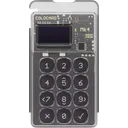
Coinkite Coldcard Mk4
Common Mistakes to Avoid
Trusting unsolicited emails or phone calls
Why it's dangerous
Phishing attackers often impersonate legitimate services to trick you into giving up sensitive information.
Do this instead
Always verify the source before responding to any request for your recovery phrase or private keys.
Clicking on suspicious links
Why it's dangerous
Phishing sites often mimic legitimate websites and can trick you into entering your private keys.
Do this instead
Always manually type the URL into your browser or use official apps to access services.
Ignoring software and wallet updates
Why it's dangerous
Outdated wallets or apps might have vulnerabilities that attackers can exploit.
Do this instead
Regularly update your wallet’s firmware and software to ensure you’re protected against the latest threats.
Conclusion
Phishing is a real threat to hardware wallet users, but with the right precautions, you can protect your crypto assets from these attacks. By understanding how phishing works, adopting best practices, and selecting the right hardware wallet, you significantly reduce your risk of falling victim to a scam.
Remember, vigilance is key. Always verify sources, use secure wallet features, and maintain good security habits to keep your crypto safe.
Frequently Asked Questions
Common questions about hardware wallets and crypto security
How do I know if an email is a phishing attempt?
Can phishing attacks target hardware wallets?
What is the best way to protect my hardware wallet from phishing?
Is it safe to share my recovery phrase with wallet support?
Ready to Choose Your Wallet?
Now that you have the knowledge, take the next step toward securing your crypto.