Understanding Clipboard Hijacking and Address Substitution Attacks
Malware replaces copied addresses with attacker wallets. How hardware wallet address verification is your last line of defense.

Introduction
TL;DR
- Clipboard hijacking and address substitution attacks manipulate copied data to redirect crypto transactions.
- These attacks typically target the user’s clipboard and exploit weaknesses in transaction signing.
- To protect yourself, always verify addresses manually and consider using hardware wallets with anti-hijacking features.
- Common defenses include using address whitelisting, multisig wallets, and advanced wallet security features.
What is Clipboard Hijacking and Address Substitution?
Clipboard hijacking is a type of attack where malicious software monitors your clipboard for copied cryptocurrency addresses. Once a user copies a wallet address to send funds, the malware replaces it with an address controlled by the attacker. Address substitution attacks work similarly, exploiting vulnerabilities in the transaction signing process. By intercepting the clipboard data, these attackers can redirect crypto transactions to their own wallets without the user realizing it.
This type of attack can occur on any device with access to the clipboard, making it a significant risk for both hardware and software wallets. The most dangerous aspect is that the user may not even notice the change until it's too late, especially if they don’t manually check the recipient address before signing the transaction.
How Does Clipboard Hijacking Work?
Clipboard hijacking usually begins with the installation of malicious software or malware that monitors the clipboard on your device. This software can be delivered through infected websites, software downloads, or phishing emails. Once the malware is on your device, it begins to watch for copied cryptocurrency addresses.
When you copy an address, whether from an exchange, wallet, or other sources, the malware replaces it with an attacker-controlled address. This happens quickly and can be nearly impossible to detect unless you closely scrutinize the transaction details.
Top-Rated Wallets for This Use Case
View all wallets
Why Clipboard Hijacking and Address Substitution Matter
Crypto transactions are irreversible, meaning once funds are sent, they cannot be recovered. Clipboard hijacking and address substitution attacks make it possible for an attacker to divert funds without the victim’s knowledge. This could lead to the loss of large amounts of cryptocurrency, especially if a user is not vigilant.
Many users trust the address they copy-paste, which is why these attacks are so effective. Since the attacker doesn't need to hack your wallet directly, they can exploit the trust users place in their clipboard data. These attacks can be particularly devastating for individuals with significant crypto holdings or those who send transactions regularly.
Best Practices to Prevent Clipboard Hijacking
To protect against clipboard hijacking, always double-check the recipient address before sending a transaction. This includes confirming the address on your hardware wallet or directly in the transaction window.
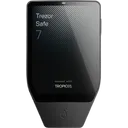
Additionally, consider using a hardware wallet with anti-hijacking features. Some wallets, like the Ledger Nano X and Trezor Model T, offer built-in protection to prevent clipboard-based attacks. Wallets that support features like address whitelisting or dual authentication are also excellent choices for added security.
How to Defend Against Clipboard Hijacking and Address Substitution
Here are some key steps to defend yourself:
- Always Verify Addresses: Manually compare the wallet address before confirming a transaction, especially when using software wallets.
- Use a Hardware Wallet: Hardware wallets like the Ledger Nano X, Trezor Model T, and BitBox02 are designed to mitigate these risks by requiring physical confirmation of addresses.
- Enable Multi-Factor Authentication: Many wallets support two-factor authentication or PIN codes that add another layer of protection.
- Install Anti-Malware Software: Regularly scan for malware and use reliable anti-virus tools to protect your devices.
Real-World Examples of Address Substitution Attacks
One notable example is the attack on a high-profile Bitcoin user in 2019, where malware intercepted their clipboard data and substituted the correct address with one controlled by the attacker. The user didn't notice until it was too late, and their funds were lost. In another case, a phishing attack on a cryptocurrency exchange led to a similar attack, with funds being diverted to an attacker’s wallet after the victim copied a fake address from the compromised site.
These cases highlight the real dangers posed by clipboard hijacking and why using extra precautions is vital when transacting with cryptocurrencies.
Choosing a Wallet to Avoid Clipboard Hijacking
When selecting a hardware wallet to defend against clipboard hijacking, look for features like address whitelisting, secure address verification, and built-in malware protections. Additionally, choose wallets that allow you to manually verify the recipient address on the device screen before finalizing the transaction.
Examples of wallets with excellent security features for this threat model include the Ledger Nano X, Trezor Model T, and Coinkite Coldcard Mk4, all of which have robust anti-hijacking measures in place to prevent these types of attacks.
What to Look for in a Wallet
Passphrase Support
Must HaveA passphrase adds an extra layer of protection, making it harder for attackers to steal funds even if they have access to your device.
Matching wallets


Air-Gapped Signing
Must HaveAir-gapped devices that never connect to the internet are crucial for preventing clipboard hijacking and other online-based attacks.
Matching wallets


Tamper-Evident Design
Nice to HaveA tamper-evident design ensures that any attempts to alter the device's hardware or software are detectable, adding extra security.
Matching wallets

Multisig Support
Nice to HaveMultisig wallets require multiple signatures to complete a transaction, which helps prevent unauthorized access.
Matching wallets

Recommended Wallets for This Threat Model
These wallets offer strong protections against clipboard hijacking and address substitution, ensuring that your crypto transactions remain secure.
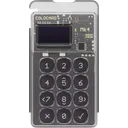
Coinkite Coldcard Mk4
Common Mistakes to Avoid
Not manually verifying addresses
Why it's dangerous
Relying on the clipboard alone can lead to address substitution, causing funds to be sent to the wrong address.
Do this instead
Always double-check the recipient address before finalizing a transaction.
Ignoring anti-malware software
Why it's dangerous
Malware can intercept clipboard data, making your transactions vulnerable to hijacking.
Do this instead
Install reputable anti-malware software and regularly update it.
Using an insecure device to sign transactions
Why it's dangerous
Insecure devices can easily become infected with malware that hijacks your clipboard.
Do this instead
Use a dedicated, offline hardware wallet for signing transactions.
Conclusion and Next Steps
Clipboard hijacking and address substitution are serious threats, but with the right precautions, you can keep your funds safe. Be vigilant, always verify transaction details, and use a hardware wallet with strong security features.
To further protect yourself, consider using a multi-signature wallet or enabling extra authentication steps. The more layers of security you have in place, the harder it will be for attackers to compromise your crypto assets.
Frequently Asked Questions
Common questions about hardware wallets and crypto security
How do I know if my wallet is secure against clipboard hijacking?
Can clipboard hijacking affect mobile wallets?
What should I do if I suspect my device is compromised?
Is there any way to prevent clipboard hijacking completely?
Ready to Choose Your Wallet?
Now that you have the knowledge, take the next step toward securing your crypto.