Air-Gapped Transaction Signing: Achieving Maximum Isolation Security
Never connect your signing device to the internet. QR code and microSD-based transaction signing for paranoid-level security.

Introduction
TL;DR
- Air-gapped signing isolates transaction signing from any internet-connected device.
- Best suited for advanced users prioritizing maximum security for their assets.
- Can be achieved with hardware wallets that support air-gapping features.
- Key benefits include protection against malware, phishing, and hardware compromises.
What is Air-Gapped Transaction Signing?
Air-gapped transaction signing is a process where a cryptocurrency transaction is signed on a device that has no direct or indirect connection to the internet. This method ensures that the private key used for signing the transaction never leaves the offline device, making it immune to many types of cyber-attacks. The concept of air-gapping adds a significant layer of security by eliminating exposure to network-based threats like hacking, malware, and phishing.
The principle behind air-gapped signing is that a physical device (such as a hardware wallet) is used to generate and store the private key offline. The signing process typically involves transferring unsigned transactions via a USB drive, SD card, or QR code to the air-gapped device, which signs the transaction and sends it back securely. This method ensures the private key never interacts with a connected device, providing maximum security.
How Does Air-Gapped Signing Work?
The process of air-gapped signing generally follows these steps: First, an unsigned transaction is created on an internet-connected device, such as a computer or smartphone. This unsigned transaction, which contains the recipient's address and the amount to be sent, is then transferred to the offline (air-gapped) device, often via a USB drive or QR code scanning. Once the offline device receives the transaction, it uses its stored private key to sign it securely. After signing, the signed transaction is returned to the internet-connected device using the same method (USB, QR code, etc.). Finally, the signed transaction is broadcast to the blockchain network from the connected device.
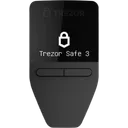
This process ensures that the private key never touches an internet-connected environment, minimizing the risk of exposure to malicious attacks. Common air-gapped devices include hardware wallets like the Coldcard Mk4 and Trezor Safe 3, which support QR code scanning or USB-based transfers for this purpose.
Top-Rated Wallets for This Use Case
View all wallets
Why Air-Gapped Signing Matters
Air-gapped signing is crucial for users who want to ensure their private keys are never exposed to online threats. As cryptocurrencies continue to grow in value, they become prime targets for cybercriminals using techniques like malware, phishing, and hardware exploits to steal funds. By keeping the signing process offline, air-gapping eliminates these attack vectors, providing unmatched protection for high-value wallets.
This method is particularly important for individuals holding large amounts of cryptocurrency or those who regularly face sophisticated attacks. While online wallets and connected devices are prone to security breaches, air-gapped signing offers a level of isolation that can’t be easily bypassed by common attack methods.
Key Considerations and Things to Know
Air-gapped signing is not a set-and-forget solution; it requires careful handling of hardware and transaction files. One of the key considerations is that transferring unsigned transactions to and from the air-gapped device can introduce risks, particularly if USB drives or SD cards are used. These media should be handled with extreme caution to avoid introducing malware from infected machines.
Additionally, users must be prepared for a more cumbersome signing process. Every time a transaction needs to be signed, the offline device must be physically accessed, which may be inconvenient for frequent transactions. Lastly, it's important to select a hardware wallet that supports true air-gapping; not all wallets on the market offer this feature in a way that completely isolates the private key.
Common Mistakes to Avoid
Even though air-gapped signing significantly reduces online risks, it’s not foolproof. Here are some common mistakes to avoid:
- Using compromised media for file transfer: USB drives or SD cards used to transfer transactions should be thoroughly vetted for malware before use. Never use media from untrusted sources.
- Inconsistent security practices: Ensure that the offline device itself is never connected to the internet, even for firmware updates. Regularly check the integrity of the device and firmware.
- Insecure backup practices: If backup files (such as seed phrases) are stored improperly, the security of the entire air-gapped process is compromised. Use secure, offline storage for these backups.
Best Practices for Secure Air-Gapped Signing
To get the most out of air-gapped transaction signing, follow these best practices:
- Use a dedicated air-gapped device: Avoid using devices that may have been exposed to online threats. A hardware wallet with air-gapping support, such as the Coldcard Mk4, is ideal.
- Ensure secure file transfer methods: Use only trusted USB drives or SD cards for transferring unsigned transactions. Always scan these media for malware before use.
- Regularly update wallet firmware: Offline devices need occasional updates. Ensure firmware is updated securely by following manufacturer recommendations and keeping the device offline during the process.
- Back up your recovery seed securely: Store your recovery seed in multiple secure, offline locations. Avoid writing it down on paper that could easily be lost or stolen.
Who Should Use Air-Gapped Signing?
Air-gapped transaction signing is recommended for advanced users who prioritize the highest level of security for their assets. This method is ideal for those with significant cryptocurrency holdings or those operating in high-risk environments where sophisticated attacks are likely. If you are a frequent traveler or work in a sector where your security is regularly targeted, air-gapped signing offers an unmatched layer of protection.
While air-gapping offers exceptional security, it may not be suitable for casual users or those who make frequent small transactions. The added complexity and slower signing process can be cumbersome for regular use.
Conclusion and Next Steps
Air-gapped signing provides an additional layer of defense against many online and offline attacks, but it requires a deliberate approach and ongoing attention to security. By understanding the risks, handling your hardware with care, and selecting the right tools, you can significantly enhance the security of your cryptocurrency transactions.
If you’re ready to implement air-gapped signing, begin by selecting a hardware wallet that supports this feature, then follow the best practices outlined here. With proper precautions, this method can offer some of the highest security available for safeguarding your assets.
“I travel frequently for work and carry my hardware wallet across international borders, where I’m concerned about targeted theft and device tampering.”
Threat Actors
- Cybercriminals
- State-sponsored attackers
Attack Vectors
- Physical theft
- Hardware tampering
- Malicious software on public networks
Assets at Risk
The loss of significant cryptocurrency holdings due to tampering or theft of the hardware wallet.
What to Look for in a Wallet
Air-Gapped Signing
Must HaveThis feature isolates the signing process from any connected device, ensuring your private key remains offline and secure.
Matching wallets

Coinkite Coldcard Mk4


Tamper-Evident Design
Must HaveTamper-evident design ensures that any physical breach of the wallet is immediately visible, preventing undetected manipulation of your device.
Matching wallets
Coinkite Coldcard Mk4

Multisig Support
Nice to HaveMultisig offers an extra layer of security by requiring multiple devices to authorize a transaction, making it harder for attackers to steal assets.
Matching wallets
Coinkite Coldcard Mk4
Recommended Wallets for This Threat Model
The following wallets are ideal for advanced users looking to implement air-gapped signing with robust security features.
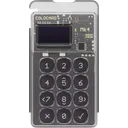
Coinkite Coldcard Mk4
Common Mistakes to Avoid
Using an air-gapped device with outdated firmware
Why it's dangerous
Outdated firmware may contain security vulnerabilities that can be exploited by attackers.
Do this instead
Ensure your air-gapped device is always updated with the latest firmware, but do so securely without connecting it to the internet.
Transferring unsigned transactions on an insecure USB drive
Why it's dangerous
A compromised USB drive can introduce malware that compromises the air-gapped signing process.
Do this instead
Use only trusted, verified USB drives and scan them for malware before each use.
Not having a secure backup of recovery keys
Why it's dangerous
Losing your recovery seed or backup could result in total loss of access to your cryptocurrency.
Do this instead
Store your recovery keys in a secure, offline location like a safe or bank vault.
Key Terms
Address Verification
Address Verification confirms the receiving address shown on a hardware wallet's screen matches the one on the computer or app, preventing malware from altering it.
Anti-Klepto Protocol
Anti-Klepto Protocol is a blockchain security mechanism that prevents unauthorized data exfiltration by verifying nonces to ensure transaction authenticity and integrity.
App Isolation
App Isolation confines each cryptocurrency app on a hardware wallet to its own secure environment, preventing vulnerabilities in one app from affecting others.
Auto-Wipe
Auto-Wipe is a security feature that automatically erases a device's data after a set number of failed login attempts, protecting sensitive information in cryptocurrency hardware wallets.
Blind Signing
Blind signing is the process of signing a transaction without viewing its contents, typically used in hardware wallets for enhanced security.
Clear Signing
Clear Signing is a process in blockchain where transaction data is displayed in human-readable form before being signed, ensuring transparency and preventing blind signing risks.
Clipboard Hijacking
Clipboard hijacking is a malware attack that monitors the clipboard and swaps a user's copied cryptocurrency wallet address with the attacker's address, diverting funds.
Crypto Custody
Crypto custody is the secure storage and management of cryptocurrency private keys, often provided by specialized custodial services.
Crypto Insurance
Crypto insurance protects cryptocurrency holdings from risks like theft, hacks, and loss through specialized policies offered by insurers.
Crypto Security
Crypto Security refers to practices, tools, and protocols that protect cryptocurrencies, private keys, wallets, and blockchain networks from theft, hacks, and unauthorized access.
Downgrade Protection
Downgrade protection prevents blockchain nodes from accepting blocks from older protocol versions, blocking rollbacks to vulnerable states via version checks.
Dust Attack
A dust attack sends tiny cryptocurrency amounts (dust) to many wallet addresses to track spending patterns and de-anonymize users on the blockchain.
EAL Certification
EAL Certification (Evaluation Assurance Level) from Common Criteria rates the security of hardware components, like secure chips in crypto hardware wallets. Higher levels, such as EAL5+ or EAL6+, indicate stronger resistance to attacks.
Encrypted Communication
Encrypted communication in cryptocurrency and blockchain secures data transmission between wallets, nodes, or users using encryption techniques like end-to-end encryption, preventing unauthorized access.
Entropy
Entropy is the randomness used to generate secure cryptographic keys or seeds in blockchain and cryptocurrency systems.
Evil Maid Attack
An evil maid attack is a physical security threat where an attacker gains temporary unsupervised access to a hardware wallet to tamper with it, install malicious firmware, or extract private keys.
Firmware Attestation
Firmware Attestation is the process of verifying the authenticity of a device's firmware to ensure it has not been tampered with, commonly used in hardware wallets for security.
Firmware Trust Model
Firmware Trust Model describes the trust level users place in a hardware wallet's firmware, from fully relying on the vendor (vendor-only trust) to independently verifying it (user verification).
Hologram Security
Hologram security refers to tamper-evident holographic seals used to verify the authenticity of hardware wallets and other crypto-related products, preventing counterfeiting.
Inheritance Planning
Inheritance planning in cryptocurrency ensures heirs access digital assets after death. It uses tools like dead man's switches or multi-signature wallets to securely share private keys.
Key Ceremony
A Key Ceremony is a secure, multi-person process to generate and distribute cryptographic keys for blockchain systems.
Man-in-the-Middle Attack
A Man-in-the-Middle (MITM) attack occurs when an attacker secretly intercepts and alters communication between a user and a blockchain service, such as changing wallet addresses during transactions.
Metal Backup
A metal backup is a durable metal plate or device engraved with a cryptocurrency wallet's seed phrase, providing fireproof and waterproof protection for offline key storage.
Non-Extractable Keys
Non-extractable keys are private keys generated and stored within a hardware wallet that users cannot export or remove, protecting them from malware or physical attacks.
Open Source Firmware
Open Source Firmware refers to firmware in hardware devices, like wallets, where the source code is publicly available, allowing transparency, auditability, and customization.
Operational Security
Operational Security (OpSec) refers to practices that protect sensitive information in cryptocurrency and blockchain activities, minimizing risks of hacking or theft through careful management of data.
Passkeys
Passkeys are a form of passwordless authentication using cryptographic keys for secure, phishing-resistant logins in blockchain and crypto applications.
Phishing Attack
A phishing attack tricks crypto users into revealing private keys, seed phrases, or login details via fake emails, websites, or messages mimicking legitimate wallets or exchanges.
Proof of Reserves
Proof of Reserves (PoR) is a method for crypto platforms to verify they hold enough assets to cover user deposits.
Randomized Keypad
A Randomized Keypad is a security feature used in hardware wallets where the PIN layout is shuffled each time, preventing PIN theft via keylogging or visual observation.
Random Number Generator
A Random Number Generator (RNG) produces unpredictable numbers essential for cryptographic security in blockchain, such as generating private keys and nonces.
Remote Key Extraction
Remote Key Extraction is a vulnerability where attackers steal private keys from hardware wallets remotely via exploits, without physical access.
Replay Attack
A replay attack occurs when an attacker captures a valid blockchain transaction and rebroadcasts it to execute multiple times, often exploiting chain forks for double-spending.
Reproducible Builds
Reproducible Builds refer to the process where the same source code consistently produces identical binary outputs, ensuring verifiable and trustworthy software in blockchain and crypto projects.
Rug Pull
A rug pull is a cryptocurrency scam where project developers hype a token or DeFi project, attract investors, then abruptly withdraw liquidity or dump holdings, crashing the price and fleeing with funds.
Secure Boot
Secure Boot is a security feature that ensures only trusted software runs on a device by verifying its integrity during startup, preventing unauthorized code execution in crypto systems.
Security Audit
A security audit is an independent review of blockchain code or smart contracts by experts to identify vulnerabilities and ensure robustness.
Self-Sovereign Identity
Self-Sovereign Identity (SSI) is a blockchain-based identity system where users control and share their personal data without relying on central authorities.
Shamir Secret Sharing
Shamir Secret Sharing (SSS) divides a secret, like a crypto wallet seed, into multiple shares. A threshold number of shares reconstructs it, enhancing security as in SLIP-39 backups.
Side-Channel Attack
A side-channel attack in cryptocurrency and blockchain targets indirect information, like power usage or timing, to extract sensitive data from a system or device.
Tamper-Evident Design
Tamper-Evident Design refers to features on hardware devices that visibly show if they have been altered, ensuring the integrity and security of blockchain assets or data.
Threshold Signature Scheme
A Threshold Signature Scheme (TSS) splits a private key among multiple parties, allowing them to jointly sign transactions without exposing the full key.
Tor Support
Tor Support enables cryptocurrency wallets and services to route connections through the Tor network, masking IP addresses to enhance user privacy.
Two-Factor Authentication
Two-Factor Authentication (2FA) secures cryptocurrency accounts and wallets by requiring two verification methods, such as a password plus a code from an authenticator app.
Frequently Asked Questions
Common questions about hardware wallets and crypto security
What is the main benefit of air-gapped transaction signing?
Are all hardware wallets air-gapped?
Can I use air-gapped signing for regular transactions?
Is air-gapped signing foolproof?
Ready to Choose Your Wallet?
Now that you have the knowledge, take the next step toward securing your crypto.