Touchscreen Display
A touchscreen display is a screen that allows users to interact with a device by touching the surface, commonly used in hardware wallets for easy navigation and transaction confirmation.
What Is a Touchscreen Display?
A Touchscreen Display is a screen that detects user input through direct touch on its surface. Users interact with the device using fingers or styluses. Hardware wallets commonly integrate this feature for intuitive navigation, PIN entry, and transaction confirmation.
Touchscreens work by sensing physical contact. Capacitive types, the most common in modern devices, use a grid of electrodes under a glass layer. When a conductive object like a finger touches the screen, it alters the local electrostatic field. The controller measures these changes to pinpoint the touch location precisely. Resistive screens, less common today, rely on pressure to connect flexible layers and register input.
In cryptocurrency hardware wallets, touchscreen displays boost security. Users verify transactions directly on the isolated device, avoiding risks from connected computers infected with malware. This air-gapped confirmation prevents man-in-the-middle attacks. Touch interfaces also simplify use without physical buttons, reducing errors in critical operations like seed phrase backups.
Key characteristics include multi-touch support for gestures like swipes and pinches, high sensitivity for glove-free use, and durability against scratches. Hardware wallets favor capacitive screens for their responsiveness and accuracy in secure environments. Synonyms include touch display and capacitive screen.
A block confirmation is the process of verifying a new block in the blockchain network, confirming its validity and preventing double-spending or fraud.
Read full definitionCryptocurrency is a digital or virtual currency secured by cryptography, operating on decentralized blockchain networks to enable secure, peer-to-peer transactions.
Read full definitionReal-World Examples
Example 1: On a Trezor Model T hardware wallet, users swipe across the touchscreen display to unlock the device with a custom pattern, ensuring secure access without physical buttons.
Example 2: During Bitcoin transaction approval on a Keystone wallet, the touchscreen display shows recipient address and amount; users tap 'Confirm' after verifying details air-gapped from the computer.
Example 3: When backing up a seed phrase on a device like the Ellipal Titan, the touchscreen display presents words one by one; users select and swipe to add them, minimizing errors in recovery setup.
Example 4: To check balance on a COLDCARD Mk4 with touchscreen mode, users navigate menus via taps on the touchscreen display, viewing assets without connecting to potentially compromised software.
Trezor is a hardware wallet by SatoshiLabs. It stores private keys offline to secure cryptocurrencies.
Read full definitionBitcoin (BTC) is the first decentralized cryptocurrency, launched in 2009. It uses blockchain technology for secure, peer-to-peer digital transactions without intermediaries.
Read full definitionKeystone is a brand of air-gapped hardware wallets, such as the Keystone Pro, that securely store cryptocurrency private keys offline.
Read full definitionRecovery is the process of restoring access to a cryptocurrency wallet using its seed phrase or mnemonic backup if the original wallet is lost or inaccessible.
Read full definition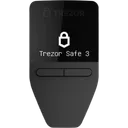
Ready to Choose a Secure Wallet?
Use our tools to find the right hardware wallet for your needs.